

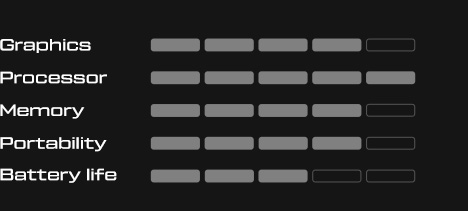


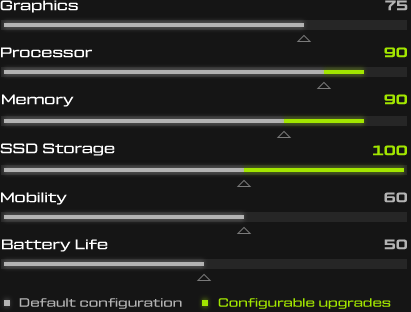

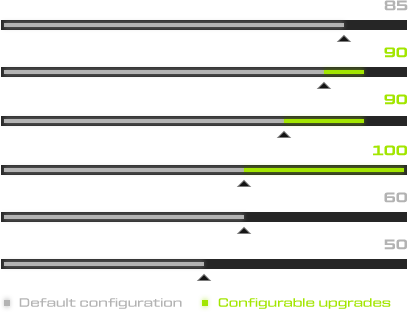

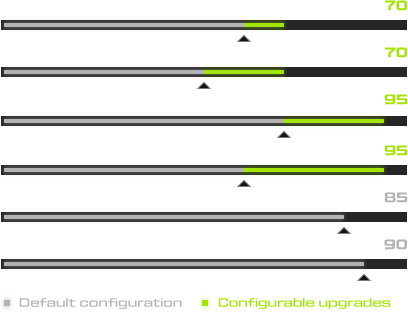
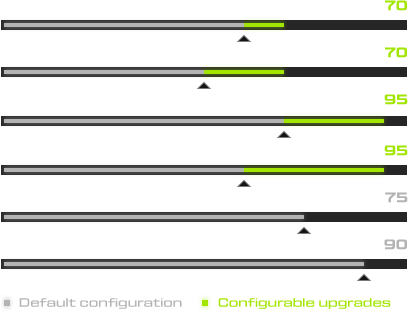

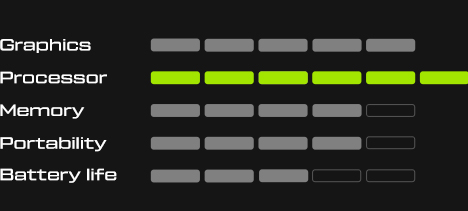




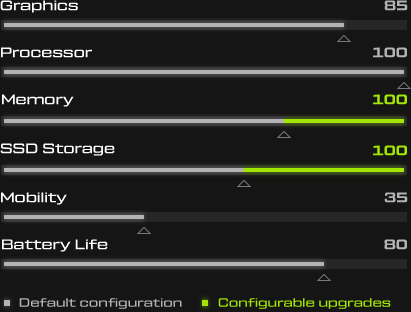
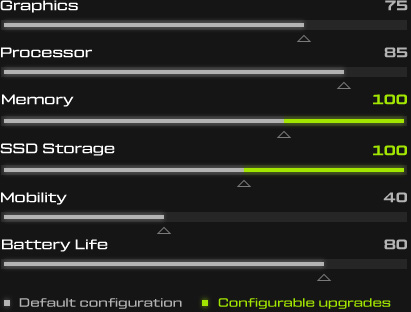































In this post, you will find current information and technical details on our flagship model XMG NEO 16 (A25/M26) and its sister models XMG PRO 16 (M25) and XMG PRO 16 Value Edition (M25/M26). Important updates are marked with the date.
Delivery status
Last update: 28 September 2026
The XMG NEO 16 (M26) can be ordered with Mini LED, OLED or IPS display. Mini LED and OLED are available in all configurations – with 5070 Ti, 5080 and the NVIDIA GeForce RTX 5090 Laptop GPU. The “normal” IPS display is only planned and available with RTX 5070 Ti.
The XMG NEO 16 (E25) with Intel Core Ultra 9 275HX is sold out and will no longer be produced. The XMG NEO 16 (A25) with AMD Ryzen 9 9955HX or 9955HX3D, on the other hand, remains in the line-up unchanged.
The XMG PRO 16 Value Edition (M26) is now also available to order and in stock. It combines the Intel Core i9-14900HX with the new GeForce RTX 5070 Laptop GPU with 12 GB GDDR7. The XMG PRO 16 (M25) and XMG PRO 16 Value Edition (M25) remain in the line-up alongside it with GeForce RTX 5060 and RTX 5070 Ti. Remaining stock of the previous RTX 5070 with 8 GB is being phased out. A new XMG PRO 18 is scheduled to be unveiled in early October.
The following table summarises the current time frames for the various configurations.
| Information | |
|---|---|
| XMG NEO 16 (M26) with IPS and OLED | Fully available (with RTX 5070 Ti). |
| XMG NEO 16 (M26) with OLED | Fully available. |
| XMG NEO 16 (M26) with Mini LED | Pre-orders are open. Available from mid October 2026. |
| XMG NEO 16 (E25) | Sold out. Will not be restocked. |
| XMG NEO 16 (A25) | Fully available. |
| XMG PRO 16 (M25) | Fully available. |
| XMG PRO 16 Value Edition (M25) | Fully available. |
| XMG PRO 16 Value Edition (M26) | Now also fully available. |
Mini-LED with G-SYNC and Advanced Optimus now available for pre-order
28 September 2026
When we launched the XMG NEO 16 (M26) in August, we announced that the Mini-LED option would only become available to order after successful validation of NVIDIA G-SYNC and NVIDIA Advanced Optimus.
NVIDIA has now completed this validation. We have therefore opened the Mini-LED option for pre-orders:
- XMG NEO 16 (M26) on bestware
The Mini-LED panel is now available with all three graphics cards offered in the XMG NEO 16 (M26):
- NVIDIA GeForce RTX 5070 Ti Laptop GPU
- NVIDIA GeForce RTX 5080 Laptop GPU
- NVIDIA GeForce RTX 5090 Laptop GPU
Compared with the OLED option already included in the starting price, the new Mini-LED option comes at no additional cost. Compared with the standard IPS panel, which is also available with the RTX 5070 Ti, the price difference is €145 incl. 19% VAT.
Availability is planned for mid-October 2026. From that point onwards, pre-orders can be assembled at our facility in Leipzig and subsequently shipped within our usual assembly and delivery times.
Comparison
The Mini-LED panel is technically identical to the corresponding panel in the AMD-based XMG NEO 16 (A25), as well as the XMG PRO 16 (M25) and XMG APEX 16 MAX (M25). However, NVIDIA validation for G-SYNC and Advanced Optimus applies exclusively to the Intel-based XMG NEO 16 (M26), and only to the Mini-LED panel – not to the OLED or IPS options.
Here is a comparison:
| OLED panel | Mini-LED panel | |
| Resolution | 2560×1600 pixels | 2560×1600 pixels |
| Refresh rate | 240 Hz | 300 Hz |
| SDR brightness | 500 nits | 750 nits |
| HDR brightness | up to 1000 nits | 1000 nits, including across large bright areas of the image |
| Colour gamut | 100% sRGB and DCI-P3 | 100% sRGB and DCI-P3 |
| NVIDIA Advanced Optimus | No, only standard NVIDIA Optimus | Yes |
| Variable Refresh Rate | 60 to 240 Hz via NVIDIA Optimus | NVIDIA G-SYNC via Advanced Optimus or in dGPU-only mode |
| Surface | glossy | matte |
| Local Dimming | not required; each OLED pixel emits its own light | 1000 zones; can be disabled |
| Total laptop weight | approx. 2.6 kg | approx. 2.8 kg |
Any references to G-SYNC or Variable Refresh Rate here explicitly refer to the display of the laptop. With compatible external monitors, NVIDIA G-SYNC and AMD FreeSync work with all of our PCs and laptops, regardless of the selected display option. NVIDIA Advanced Optimus also applies exclusively to how the laptop’s own display is connected.
What if I have already ordered my XMG NEO?
If you have already ordered an XMG NEO 16 (M26) with an IPS or OLED panel and would prefer to switch to Mini-LED, you can have your order adjusted accordingly.
Simply reply to your order confirmation with a short request for the change. If you modify your order in this way, the delivery schedule will be based on the current forecast for Mini-LED: available from mid-October, plus the usual assembly and delivery time.
If you have already received your XMG NEO, our standard 30-day extended right of withdrawal still gives you the option to adjust your order. In this case, we ask that you leave all protective films on the device wherever possible and submit your request for the change immediately. The exchange will be handled through our RMA return process, including a prepaid DHL shipping label provided by us.
What is NVIDIA Advanced Optimus?
NVIDIA Advanced Optimus allows the connection of the internal display to switch dynamically between the iGPU and the NVIDIA GPU without requiring a restart. In principle, it is the automatic version of the MUX switch found in every XMG gaming laptop.
With conventional NVIDIA Optimus, by contrast, the internal display remains permanently connected to the iGPU. Frames rendered by the NVIDIA GPU are first routed through the iGPU before reaching the display. A direct dGPU connection is only possible by manually switching the MUX switch – without Advanced Optimus, this switch requires a restart.
What is NVIDIA G-SYNC?
NVIDIA G-SYNC dynamically synchronizes the display’s refresh rate with the frame rate output by the NVIDIA GPU. This reduces typical effects such as tearing and makes frame output and motion appear smoother, particularly when FPS fluctuate.
Unlike a fixed refresh rate, the display therefore continuously adapts to the frames actually being rendered. This requires a direct or appropriately validated connection between the NVIDIA GPU and the internal display.
G-SYNC in laptop displays is based on the open “VESA Adaptive Sync” standard, which is also used by AMD FreeSync. Intel now refers to this technology in its driver using the brand-neutral term “Variable Refresh Rate” (VRR).
The main difference between models with and without G-SYNC lies in how the display is connected. With NVIDIA G-SYNC, the technology also works when the laptop display is connected directly to the dGPU via the aforementioned MUX switch. On configurations without G-SYNC, however, VRR only works when the laptop display is connected to the iGPU. The display still synchronizes with the frames supplied by the dGPU, but those frames first have to pass through the iGPU’s framebuffer. A direct dGPU connection can theoretically enable higher frame rates – with the greatest effect when FPS are already very high. The impact on system latency is also measurable, which is why fast-paced shooters in particular are generally better suited to a direct dGPU connection. A somewhat older test by Jarrod’s Tech put the difference at around 2-3 milliseconds.
Further information
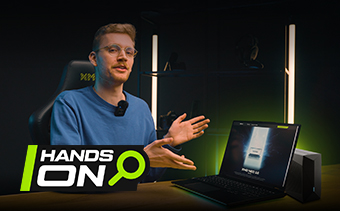
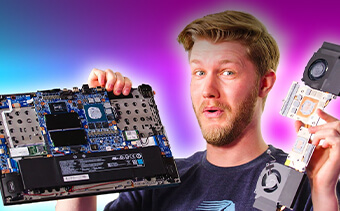
Our YouTube channel features an in-depth introduction to the XMG NEO 16 (M26) with our new host David:
- XMG NEO 16 (M26): Our best gaming laptop now with OLED | Hands-On (German with English subtitles)
More information about the technologies mentioned above is available in these product-independent FAQ articles:
- What are the differences between NVIDIA G-SYNC, AMD FreeSync and Intel Adaptive Sync?
- In which XMG laptops can NVIDIA Optimus be disabled?
What’s new in the XMG NEO 16 (M26)?
The XMG NEO 16 (M26) is the direct successor to the previous E25-generation of XMG NEO. The AMD-based XMG NEO 16 (A25) remains unchanged in the line-up alongside its new, Intel-based counterpart.
The chassis, motherboard architecture, cooling system and I/O layout of the M26 are largely based on the predecessor. The refresh focuses on the components for which a relevant upgrade is actually available in 2026:
- The Intel Core Ultra 9 290HX Plus replaces the Core Ultra 9 275HX.
- For the first time, the XMG NEO 16 is available with a 240 Hz HDR1000 OLED display.
- The more affordable 300 Hz IPS panel now covers DCI-P3 as well as sRGB in full, although it is now only available with the GeForce RTX 5070 Ti.
- OLED and IPS support Variable Refresh Rate via NVIDIA Optimus.
- The sustained combined CPU and GPU power limit with XMG OASIS increases from 280 to 300 watts (RTX 5080/5090 only).
The selection of NVIDIA graphics cards remains unchanged. The cooling system with two large main fans, a third fan for the memory and support for XMG OASIS is also carried over from the E25 and A25 models.
Intel Core Ultra 9 290HX Plus in detail
More performance on an existing architecture
The Intel Core Ultra 9 290HX Plus fundamentally remains based on the familiar Arrow Lake HX architecture. Like the Core Ultra 9 275HX, it has a total of 24 cores, consisting of 8 Performance and 16 Efficiency cores.
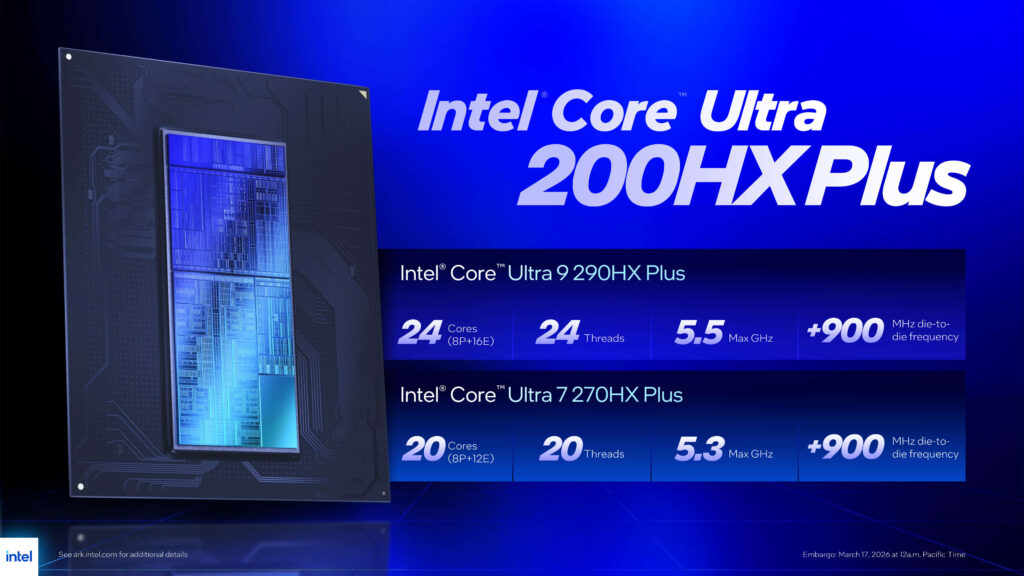
Compared with the Core Ultra 9 275HX in the XMG NEO 16 (E25), the maximum CPU clock increases from 5.4 to 5.5 GHz. The biggest technical improvement, however, comes from the combination of lower system latencies and further refinements within the existing platform. Compared with the previous generation, Intel particularly highlights a 900 MHz increase in die-to-die frequency. This interconnect is involved, among other things, in communication between the CPU, uncore and memory controller.
A higher frequency on this path reduces latency within the processor system. This particularly benefits workloads that frequently exchange data between CPU cores, cache, memory controller and system memory. In games, the advantage is most apparent in CPU-limited scenarios and at high frame rates. Support for the Intel Binary Optimization Tool adds another factor, allowing supported titles to achieve further frame-rate improvements through additional optimisations.
Intel Binary Optimization Tool
The Intel Binary Optimization Tool, unofficially abbreviated as IBOT, is part of Intel’s extended optimisation framework. It is activated through the Advanced Mode of Intel Application Optimization and only works with supported applications and games.
IBOT is not an overclocking mechanism. Instead, the tool adds another optimisation layer for program code. It uses Intel compiler and profiling technologies to optimise libraries and executable code and reduce architectural bottlenecks.
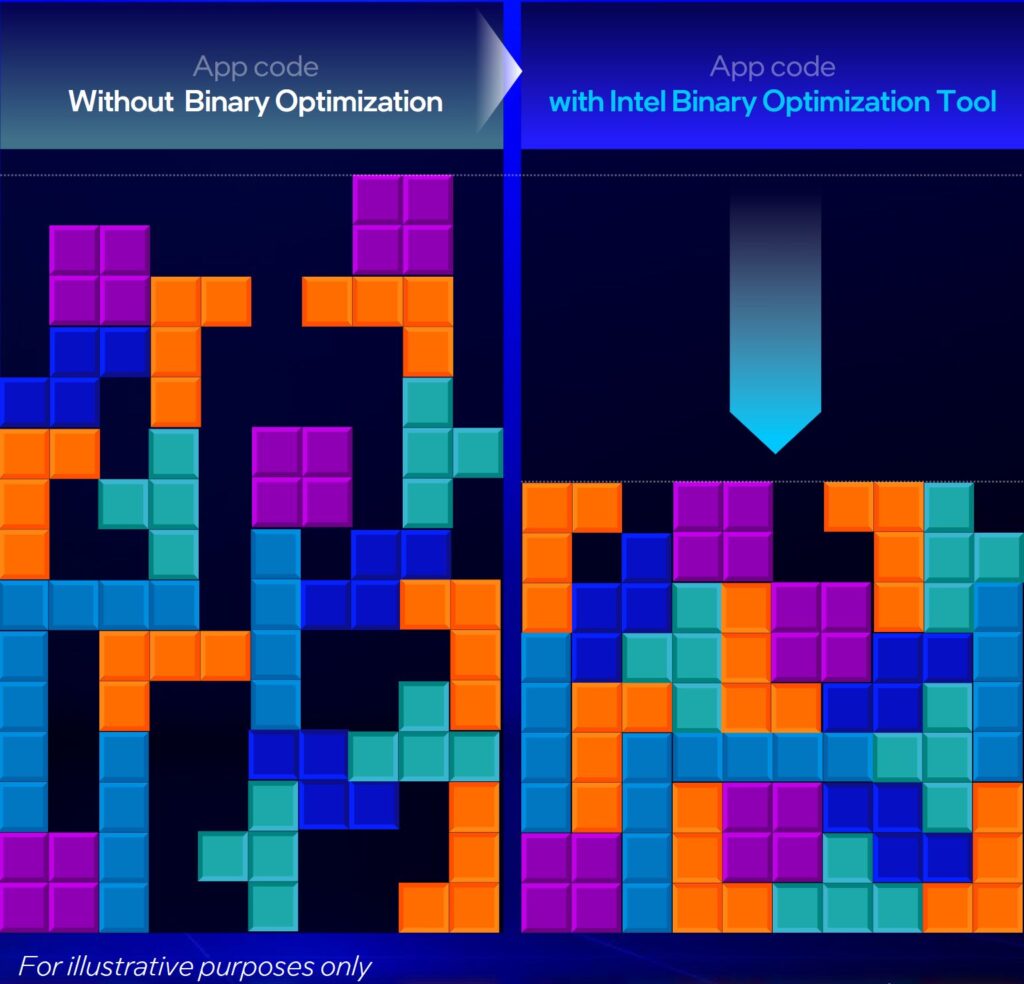
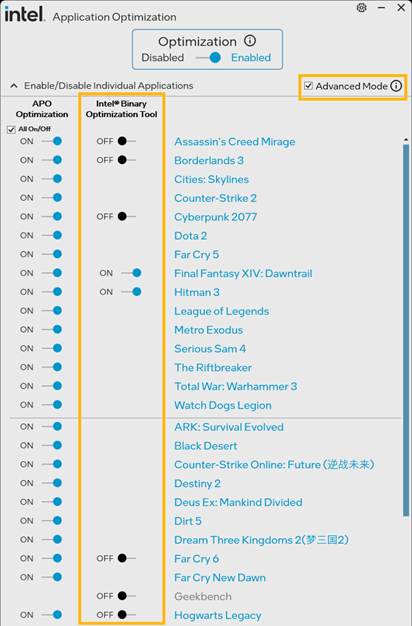
The XMG NEO 16 (M26) supports IBOT as well as Intel Application Optimization and the Intel Platform Performance Package. Supported games therefore gain an additional performance uplift. Unsupported applications continue to run normally while still benefiting from the processor’s hardware improvements.
What does this mean for gaming performance?
Across 32 games, Intel reports up to 8% higher average gaming performance for the Core Ultra 9 290HX Plus compared with the Core Ultra 9 285HX – and therefore somewhat more compared with the 275HX in the XMG NEO 16 (E25). The tests were performed at Full HD resolution with an RTX 5090 Laptop GPU; IBOT was only active in a small number of selected titles.
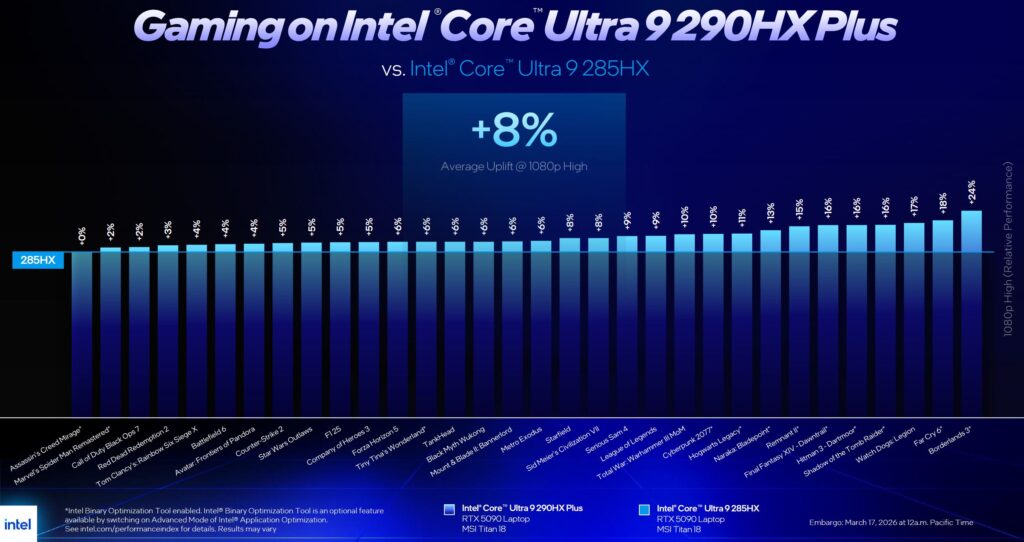
In practice, the advantage is strongest when the CPU is the limiting factor:
- E-sports titles at very high frame rates
- Strategy games and simulations with high CPU load
- Games with particularly large numbers of draw calls
- Scenarios with lower resolution or reduced graphics settings
- CPU-heavy 1% low and frame-time scenarios
Independent measurements in numerous press reviews have also confirmed these performance gains.
Performance profiles
Our laptops can generally be operated with a number of performance profiles. Profiles with lower power limits enable more efficient operation and thus reduce system noise. The following table provides an overview of the preconfigured performance profiles and their impact on CPU and GPU power limits.
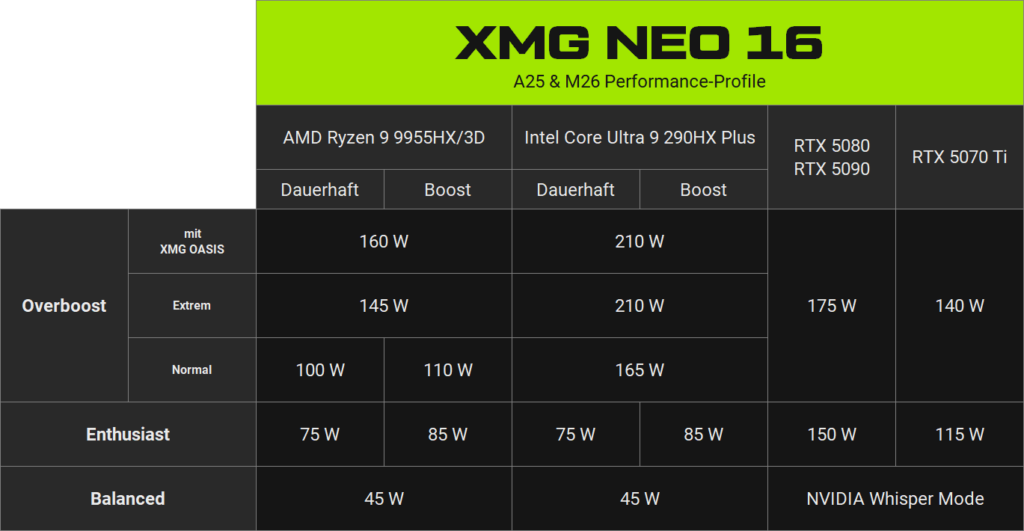
This is related to the factor of ‘diminishing return’, where silicon at the top of its power curve may not get much more performance per watt, no matter how much you push the power limit. The same can be said about the efficiency of a cooling system in relation to fan speed. At a certain point, higher fan speed gets you more noise, but not neccessarily more cooling (or only in minute amounts).
The reverse is also true: As power consumption decreases, performance does not decline proportionally. A moderately reduced power limit can significantly lower noise and temperatures while only slightly reducing actual application or gaming performance. CPU and GPU power limits and fan curves can also be adjusted manually.
Mini-LED or OLED: two high-end options with different strengths
The XMG NEO 16 (M26) offers a degree of choice that is rare in the current high-end segment. Many powerful gaming laptops are offered with either OLED or Mini-LED, but rarely with both. With the XMG NEO 16, both technologies are available within the same platform.
OLED: perfect blacks and precise HDR highlights
On an OLED display, every pixel generates its own light. A black pixel is completely switched off. This produces virtually unlimited contrast, very clear dark scenes and pixel-precise separation between bright and dark areas of the image.
The OLED panel in the XMG NEO 16 (M26) offers:
- 2560×1600 pixels
- 240 Hz
- 500 nits with SDR content
- up to 1000 nits with HDR content
- 100 % sRGB and DCI-P3
- Variable Refresh Rate from 60 to 240 Hz via NVIDIA Optimus
- glossy surface
- a total laptop weight of only approx. 2.6 kg
OLED is particularly well suited to games and movies with dark scenes, HDR content with clearly defined light sources, and applications where black levels and pixel-level contrast are a priority.
Mini-LED: higher sustained brightness and a matte surface
Note: The Mini-LED panel planned for the M26 generation cannot currently be ordered. It will only be introduced once validation of G-SYNC and NVIDIA Advanced Optimus has been successfully completed.
Technically, the planned Mini-LED panel remains an IPS LCD. However, its backlight is divided into around 1000 individually controllable zones. This allows the display to selectively dim dark areas while simultaneously displaying very bright content.
The Mini-LED panel planned for the XMG NEO 16 (M26) is identical to the panel in the E25 predecessor and in the XMG PRO 16 and XMG APEX 16 MAX. Its specifications are:
- 2560×1600 pixels
- 300 Hz
- 750 nits with SDR content
- 1000 nits with HDR content, including large bright image areas
- 100 % sRGB and DCI-P3
- matte surface
- Local Dimming can be disabled
- a total laptop weight of approx. 2.8 kg, making it 200 grams heavier than the OLED panel
- Planned: NVIDIA G-SYNC and NVIDIA Advanced Optimus
Mini-LED is the stronger choice for very bright working environments, consistently bright SDR content, large white areas and users who prefer a matte surface. The panel also reaches 300 rather than 240 Hz.
Because a Mini-LED zone is significantly larger than an individual pixel, it cannot achieve the pixel-level black separation of an OLED display. In particularly high-contrast scenes, slight halos can appear around bright objects. In return, high brightness is maintained even with full-screen bright content, and its 750 nits in SDR mode – Windows, Office and web content – surpasses the OLED panel’s 500 nits.
As with the 2025 models, Local Dimming can be disabled in Control Center without rebooting. This is particularly useful for colour-critical image editing, as brightness and colour reproduction then depend less on the surrounding image content. Since Control Center 5.57.51.60 (January 2026), the user-selected setting is also retained reliably after a cold boot or after waking from hibernation. This applies to all XMG models with Mini-LED since the E25 generation.
IPS in the base configuration
Configurations with the GeForce RTX 5070 Ti are also available with a conventional IPS panel. It reaches 500 nits and 300 Hz and fully covers both sRGB and DCI-P3. The surface is matte. This is the same panel that is also used in the XMG PRO 16 (M25).
An IPS panel with a conventional LED backlight offers neither the black levels of an OLED panel nor the superior SDR brightness of Mini-LED, but its specifications are still very solid for gaming, content creation and general use as a desktop replacement.
The OLED display in detail
Comparison with the OLED panel in XMG FUSION 16
The OLED display in the XMG FUSION 16 (M25) offers 2880×1800 pixels, 120 Hz and 400 nits. It does not support an extended HDR brightness range. A small white area therefore remains limited to around 400 nits, just like a large white image.
| XMG FUSION 16 (M25) | XMG NEO 16 (M26) | |
|---|---|---|
| OLED panel model name | Samsung ATNA60CL10 | Samsung ATNA60HU01 |
| Resolution | 2880×1800 | 2560×1600 |
| Refresh rate | 120 Hz | 240 Hz |
| SDR brightness | 400 nits | 500 nits |
| HDR brightness | 400 nits | 1000 nits |
| Color gamut coverage | 100 % DCI-P3 | 100 % DCI-P3 |
The new OLED panel in the XMG NEO 16 (M26) doubles the refresh rate to 240 Hz and introduces proper HDR operation with up to 1000 nits. Its 2560×1600 resolution is slightly lower, but better suited to the native gaming performance of current laptop graphics cards. SDR brightness also increases to 500 nits, meaning the new OLED panel also surpasses the previous panel in the XMG FUSION 16 with non-HDR content such as web, Office and multimedia.
Brightness ratings by OPR (On-Pixel Ratio)
With many OLED displays, the maximum achievable brightness depends on the size of the bright area on screen. A small HDR highlight, a large bright scene and a completely white test image place different demands on an OLED panel.
OLED pixels generate their own light. A large number of pixels emitting very bright light at the same time increases both power consumption and the thermal load on the panel. The display therefore gradually reduces maximum brightness with particularly large white areas.
This is normal behaviour and is also seen in many smartphone and TV OLED displays. To describe this behaviour transparently, we use the industry-standard metric of “On-Pixel Ratio”, or OPR. It indicates the proportion of pixels that are “on” – specifically: “on” at full brightness.
- OPR20 means that 20 % of the display area is white.
- OPR50 means that 50 % of the display area is white.
- OPR80 means that 80 % of the display area is white.
- OPR100 corresponds to a completely white screen.
A 16:10 test image with an OPR of 50% looks exactly like this:

For the OLED panel in the XMG NEO 16 (M26), we specify the following HDR brightness levels:
| Available HDR brightness | |
| OPR20 | 1000 nits |
| OPR50 | 950 nits |
| OPR80 | 700 nits |
| OPR100 | 550 nits |
The OPR50 figure is particularly noteworthy. Even when half of the display is showing pure white, brightness remains at 950 nits, still very close to peak brightness. It only drops more substantially with even larger bright areas.
HDR content requires more than setting Windows to HDR “enabled”
Brightness values above the specified SDR brightness of 500 nits apply exclusively to HDR content. With normal SDR content, the OLED panel supports only 500 nits. This limitation is also fairly common. OLED laptop panels exceeding 500 nits in SDR do exist, but they either have lower refresh rates or are extremely expensive.
This means that the Windows desktop, Office applications, normal websites and conventional SDR images are not automatically displayed at 1000 nits. Even with Windows HDR enabled, the operating system treats SDR and HDR content as separate brightness ranges.
HDR applications can deliberately render individual areas of the image above the normal SDR white point. Typical examples include:
- sunlight and reflections in a game
- headlights, fire or explosions
- bright light sources in a dark scene
- appropriately mastered HDR videos
- HDR images in compatible image viewers, for example HDR + WCG Image Viewer
A normal white background in Word, Excel or a browser, however, remains SDR content. Windows does not provide a general user setting that simply boosts every white SDR pixel to the maximum HDR peak brightness.
Windows and the Intel graphics driver provide various contrast, brightness and power-saving functions, but no universal “1000-nit SDR mode”. Actual use of the HDR range depends on the operating system, application, graphics pipeline and content.
To see the 1000 nits in action, you need to:
- Enable Windows HDR.
- In games, use the native HDR mode provided by the respective game engine.
- Adjust HDR brightness and tone mapping in the game to match the display.
- For videos and images, make sure that both the content and the application being used actually support HDR.
The OLED panel shows its greatest advantages in games and videos that control their own HDR output path. In conventional desktop applications, the main benefits remain the high SDR brightness of 500 nits and the characteristic OLED black level.
OLED in everyday use
The OLED panel has a glossy surface. This contributes to the clear, high-contrast image, but it also reflects light sources more strongly than a matte IPS or Mini-LED display. In bright rooms, the position of windows and lamps should therefore be taken into account.
Because each OLED pixel generates its own light, power consumption increases with the overall brightness of the displayed image. Conventional LCD panels, by contrast, use a continuously active backlight and create black by blocking as much of that light as possible. Therefore, in OLED, dark surfaces reduce power consumption, meaning that consistently using “Dark Mode” in the operating system, applications and web browser can indeed improve battery life.
What about OLED burn-in?
As with any OLED display, there remains a residual risk of permanent image retention (“burn-in”) if bright, static content is displayed at the same position for extremely long periods of time. Modern notebook OLED panels are considerably more robust in this respect than earlier generations, however, and protection does not rely solely on careful user behaviour.
The Samsung OLED panels used in our current XMG laptops incorporate internal compensation and mitigation mechanisms designed to reduce uneven pixel aging. These mechanisms operate autonomously inside the panel and do not require support from Windows, BIOS, GPU drivers or Control Center. Samsung considers the exact algorithms proprietary and therefore does not disclose the individual functions.
These panel-internal safeguards substantially reduce the practical risk, but they might not make OLED completely immune to uneven aging under every conceivable usage pattern.
Therefore, despite the much reduced risk compared with older OLED generations, we generally advise for an abundance of caution. Our recommendations for suitable Windows settings and additional measures for reducing unnecessary static pixel stress can be found here:
Our recommendations include measures such as:
- automatically switch off the display when idle
- use Dark Mode in Windows and frequently used applications
- consider to automatically hide the taskbar
- use a brightness level appropriate for the environment
- when away from the laptop: manually switch off the display via Fn+F8 or lock the screen with Win+L. When the screen is locked, the display also switches off after a short time, independently of the timer configured in the operating system
Exactly where to find those settings is documented in our compaion reader linked above. The document also includes recommendations for a number of third party apps that help reduce static pixel content even more:
| Description | |
|---|---|
| Dark Reader Website · Edge · Chrome · Firefox | Applies a dark theme to most websites while preserving readability. Individual websites can be excluded if needed. |
| AutoHideDesktopIcons Website | Automatically hides desktop icons after a configurable delay, reducing permanently static elements. |
| OLEDShift GitHub | Slightly shifts window positions over time so that static interface elements do not continuously stress exactly the same pixels. |
| Lively Wallpaper Website | Provides animated or dynamic wallpapers. We’d recommend some of the darker, more subtle designs. |
If you have any further questions about the OLED panel in your XMG gaming laptop, please contact us.
Why isn’t the OLED display available with AMD?
The fact that we can only offer the new OLED panel in the Intel-based XMG NEO 16 (M26) is related to validation by the CPU manufacturer and OLED panel maker.
Laptop display panels have to be validated separately for each platform so that HDR/SDR behaviour, stability and power efficiency are reproducible across all intended operating modes. OLED has historically been somewhat more complicated in this respect.
One example of such platform-specific differences concerns HDR-related brightness and panel control via eDP. In practice, both a standardised VESA implementation and an Intel-specific proprietary implementation exist. Depending on what a panel – and its TCON – expects or best supports in a given generation, this can affect whether the panel can be integrated into other platforms.
In addition, modern OLED panels are developed in very high volumes for standardised platforms. Custom firmware branches for individual laptop models and smaller production volumes are not readily offered, particularly by large panel manufacturers such as Samsung. Without support from the panel manufacturer, a second platform-specific integration will be impossible to implement.
The limitation is therefore not artificial product segmentation. We will continue to watch this space for future panel generations. As soon as an OLED panel can be integrated flawlessly across platforms, we would be very happy to offer OLED on AMD platforms as well. At present, however, there are no such plans – there simply is no OLED panel available to us that is both suitable in all respects and compatible with AMD.
Selected sample images and videos for HDR1000 displays
HDR is difficult to convey through words or conventional screenshots. After all, the key difference is that an HDR display can reproduce significantly brighter areas of an image than a conventional SDR screen. Anyone viewing the same content on an SDR display will inevitably see a correspondingly tone-mapped version instead.
For owners of HDR-capable displays, we have therefore compiled a selection of genuine HDR image files and videos. These samples are suitable not only for the OLED and Mini-LED displays of the XMG NEO 16 (M26), but also for other HDR-capable laptops and monitors in general.
| Description | File format | Recommended media viewer | Links |
|---|---|---|---|
| OPR test images from OPR1 to OPR100 in HDR1000 | JXR (JPEG XR), scRGB, up to 1000 nits | HDR + WCG Image Viewer | Download |
| HDR sample wallpaper images from Microsoft | JXR (JPEG XR), scRGB, wide gamut, approx. 770–1380 nits | HDR + WCG Image Viewer | Download, Source |
| Ultra HDR Samples by Mishaal Rahman | JPEG_R (Ultra HDR JPEG with gain map) | Google Chrome | Download, Source |
| Sol Levante (2020) | QuickTime MOV / Apple ProRes 4444 XQ, 4K/24p, BT.2020/PQ (ST 2084), 1000-nit HDR10 master | VLC media player | Download (35 GB; Right-click → Save link as…), Source (Netflix Open Content) |
| Chimera (2014) | MP4, DCI 4K/60p, P3/PQ (ST 2084) | VLC media player | Download (10 GB; Right-click → Save link as…), Source (Netflix Open Content) |
Our OPR test images are freely available under CC0 1.0 (public domain). They originate from our own display testing procedure and consist of white areas of different sizes against a black background. Their purpose is to measure maximum HDR brightness at different On-Pixel Ratios.
The five Microsoft sample images are not normalised to a common HDR peak. Our analysis of the decoded scRGB pixel values shows maximum luminance levels ranging from around 770 to 1380 nits, depending on the image. No licensing information is included; we assume that linking to the files here with proper attribution to the source is permissible.
The final three entries in the table above are available under CC BY 4.0. They may therefore also be used and redistributed commercially. If you republish them yourself, the respective attribution requirements must be observed.
The table indicates which image viewer or video player we recommend for each file. Not every Windows application reliably supports all of the HDR formats and colour spaces used here. Built-in Windows applications such as Photos and Movies & TV can generally open these files, but may not necessarily reproduce their HDR content correctly (as of August 2026).
For correct playback in the recommended media viewers, HDR must also be enabled in Windows Display settings for the respective display.
There is also a popular Reddit thread containing additional sample images. These are JXR snapshots from various demo reels shared by panel manufacturers with their partners. Since the licensing terms of these demo reels are unclear – and they should therefore be assumed not to be licence-free – we do not link directly to these test images.
Incidentally, Windows now also supports the JXR HDR format for desktop wallpapers (sources: Neowin, Windows Blog). That’s where the HDR sample wallpaper images come from.
If you would like to try HDR in games as well, NvTrueHDR can enable NVIDIA’s RTX HDR conversion at driver level for many DirectX games, including titles without native HDR support. The tool is an alternative to the RTX HDR feature in the NVIDIA App and provides additional controls for image quality and HDR behaviour.
Hybrid graphics, MUX switch and variable refresh rate
NVIDIA Optimus and the MUX switch
All current XMG laptops with dedicated graphics have a MUX switch – including the XMG PRO 16 and XMG NEO 16. This allows the internal display to be driven either through the processor’s integrated graphics or directly through the NVIDIA graphics card. See our FAQ article:
With NVIDIA Optimus enabled, the NVIDIA GPU renders demanding applications while display output is handled by the more efficient iGPU. This reduces power consumption in everyday use and allows the NVIDIA GPU to switch off completely at low load.
In dGPU mode, the internal display is connected directly to the NVIDIA graphics card. This eliminates the additional transmission path through the iGPU. It reduces latency and allows the 300 Hz panels to operate at their full maximum refresh rate.
Switching between the two modes is done through the Control Center or BIOS. On models without Advanced Optimus, a restart is required.
Variable Refresh Rate on OLED and IPS
The OLED and IPS displays in the XMG NEO 16 (M26) support Variable Refresh Rate through the Intel iGPU when NVIDIA Optimus is enabled.
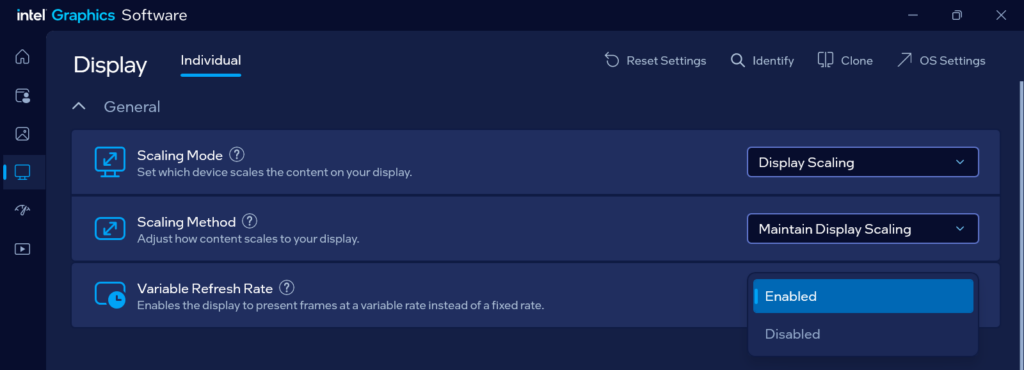
On the OLED panel, VRR operates between 60 and 240 Hz. Below 60 FPS, the display can no longer match its refresh rate directly to every rendered frame. Without V-Sync, this results in “screen tearing”: parts of two consecutive frames may briefly appear on screen at the same time, usually as a horizontal break in the image.
This is normal behaviour rather than a fault, and how noticeable it is depends heavily on the game and camera movement. In practice, sustained frame rates below 60 FPS are also a good reason to reduce a few graphics settings.
The 300 Hz IPS panel also supports VRR via NVIDIA Optimus. Due to its connection through Intel’s iGPU, however, it is limited to 240 Hz. The VRR range on the IPS panel is between 100 and 240 Hz. Disabling NVIDIA Optimus allows the panel to operate at 300 Hz with slightly lower latency – but without VRR.
External monitors are independent of this. HDMI 2.1 and Mini DisplayPort 2.1 are connected directly to the NVIDIA GPU and support compatible G-SYNC and FreeSync monitors. The two USB-C outputs run through the Intel iGPU and, depending on the connected display, can also support VRR or Adaptive Sync.
Differences between XMG PRO and XMG NEO
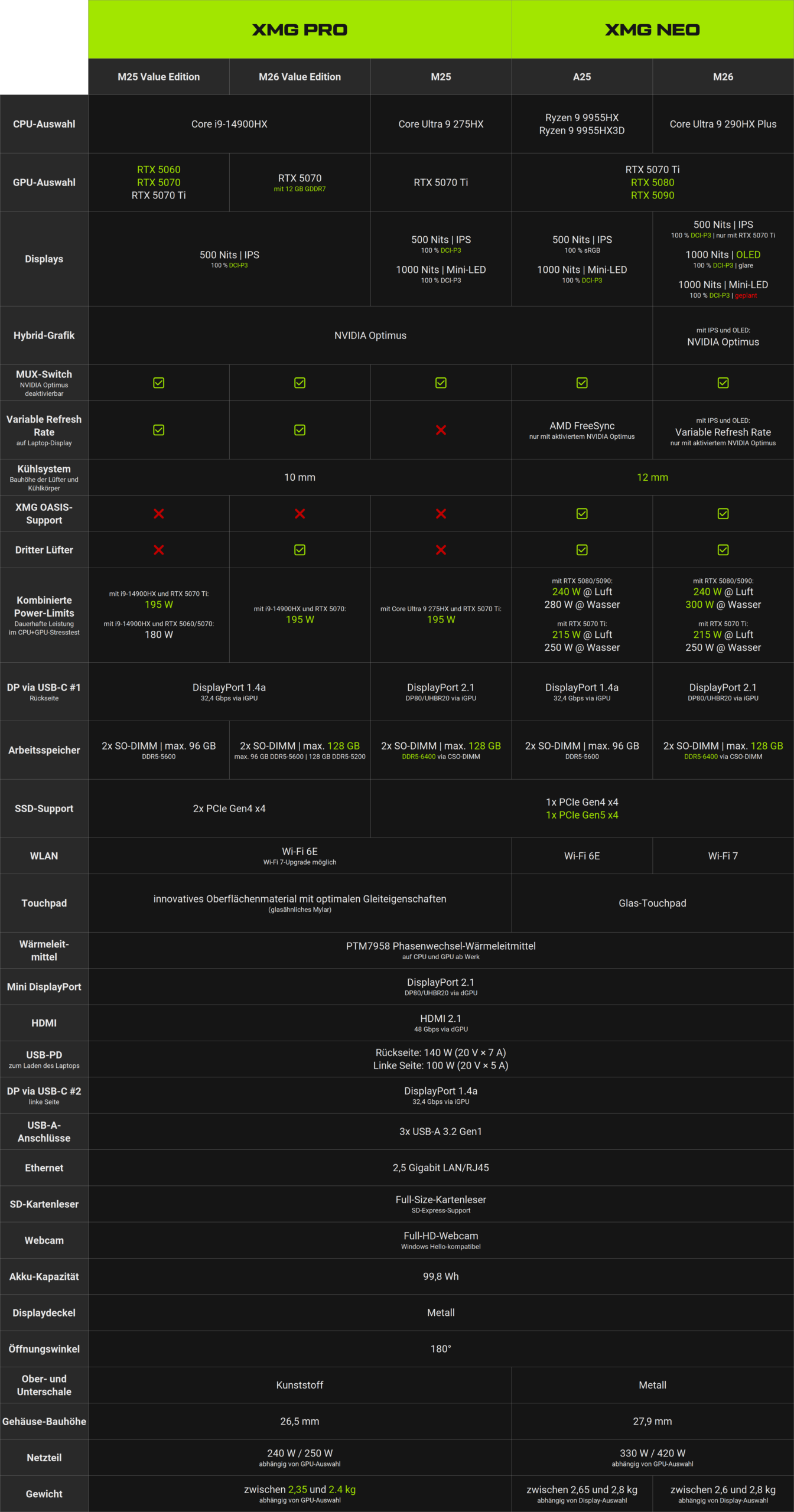
The current variants of the XMG PRO 16, including the Value Edition, and the XMG NEO 16 share many fundamental characteristics: powerful HX-series processors, NVIDIA graphics up to the GeForce RTX 5070 Ti – or beyond in the case of the XMG NEO – upgradeable memory, two M.2 slots and a comprehensive selection of I/O ports.
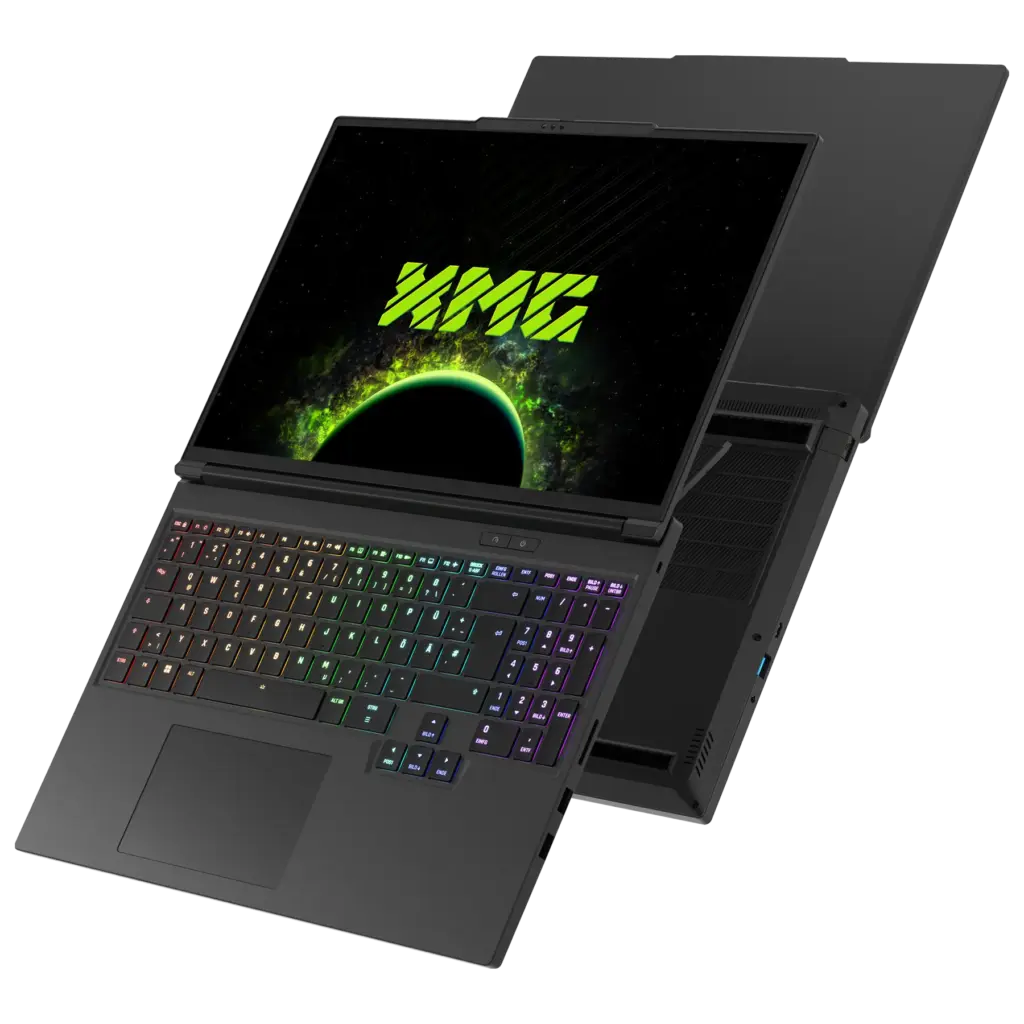
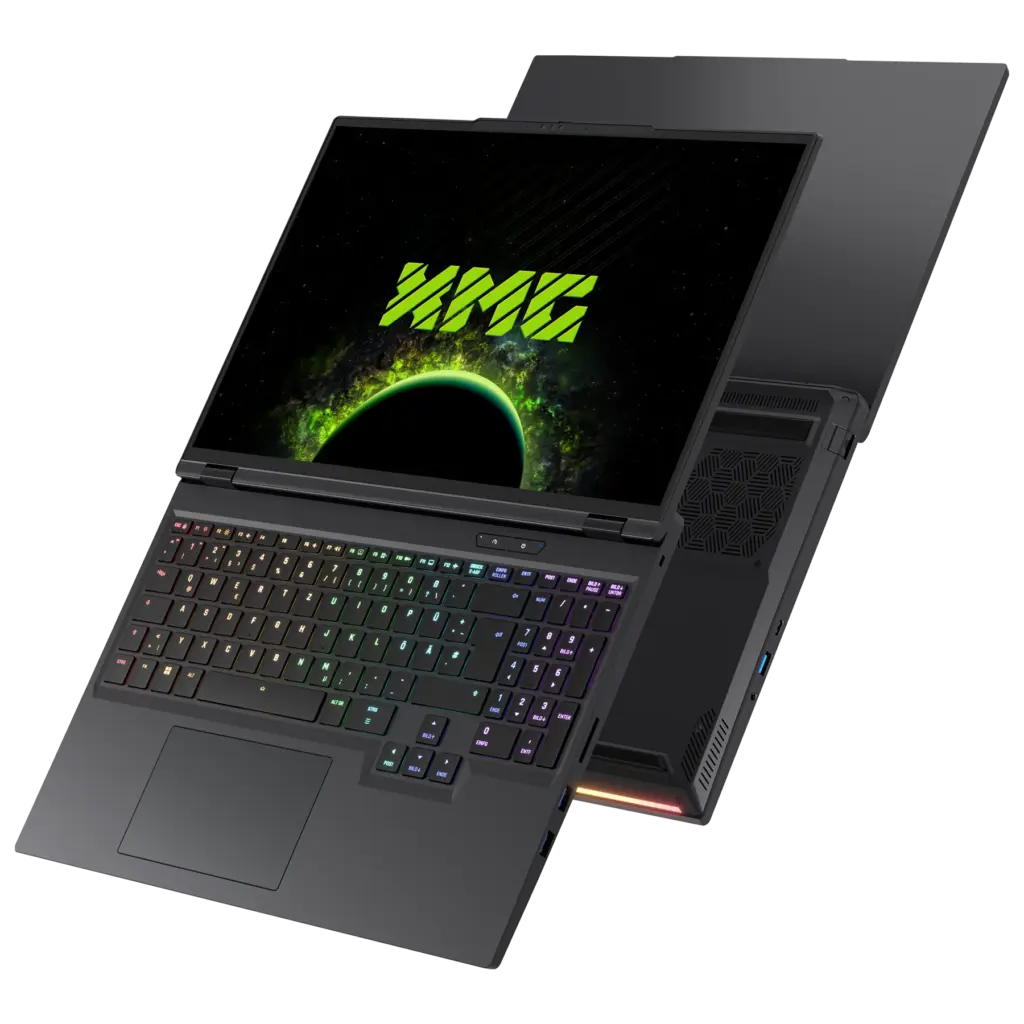
With further similarities in chassis design, keyboard layout and connectivity, the obvious question is: what actually sets these two flagship series apart?
The following table summarises all relevant similarities and differences:
For further information, we recommend reviewing the spec sheets and shop configurators:
What’s new in the XMG PRO 16 Value Edition (M26)?
The XMG PRO 16 Value Edition (M26) is an incremental evolution of the previous 2025 Value Edition. As the table above shows, the Intel Core i9-14900HX, 300 Hz IPS display, I/O configuration and fundamental chassis platform remain unchanged. The most important new feature is the GeForce RTX 5070 Laptop GPU with 12 instead of the previous 8 GB of GDDR7.
At face value, this new GPU variant offers the same compute performance as the previous one: clock speeds, CUDA core count and memory interface are identical to the previous RTX 5070 Laptop GPU. However, with 1.5 times as much video memory, it can now accommodate larger assets – such as higher-resolution textures, without any performance losses. We provide further details in the following FAQ article:
As part of this upgrade, we have also revised the cooling system. An additional third fan, already familiar from the XMG NEO, cools the memory and then directs the air, which has only been moderately warmed by the RAM, across the central area of the CPU/GPU thermal module and out of the chassis. Accordingly, the bottom case features additional ventilation openings for both air intake and exhaust.
Thanks to this airflow upgrade and several detailed optimisations to the mainboard, there is more headroom under simultaneous high CPU and GPU load: with the Core i9-14900HX and RTX 5070, the M26 Value Edition sustains a stable 195 watts in a combined CPU+GPU stress test. This puts the combined power limit of the new RTX 5070 configuration on the same level as the 2025 variants of the XMG PRO 16 with RTX 5070 Ti. By contrast, the M25 configuration with RTX 5070 and 8 GB VRAM was limited to only 180 watts.
The additional headroom is particularly beneficial in scenarios where both the CPU and GPU are heavily loaded at the same time.
The XMG PRO 16 Value Edition (M25) will remain available alongside its newer sibling. They both complement each other: the M26 focuses on the new RTX 5070 with 12 GB VRAM, while the M25 continues to cover configurations with the RTX 5060 and the faster RTX 5070 Ti. The M25 variant with RTX 5070 Ti will not receive a refresh with the third fan. However, due to the higher maximum GPU power, it already has a slightly larger thermal module than the variants with RTX 5060 and RTX 5070.
Look inside
XMG NEO 16
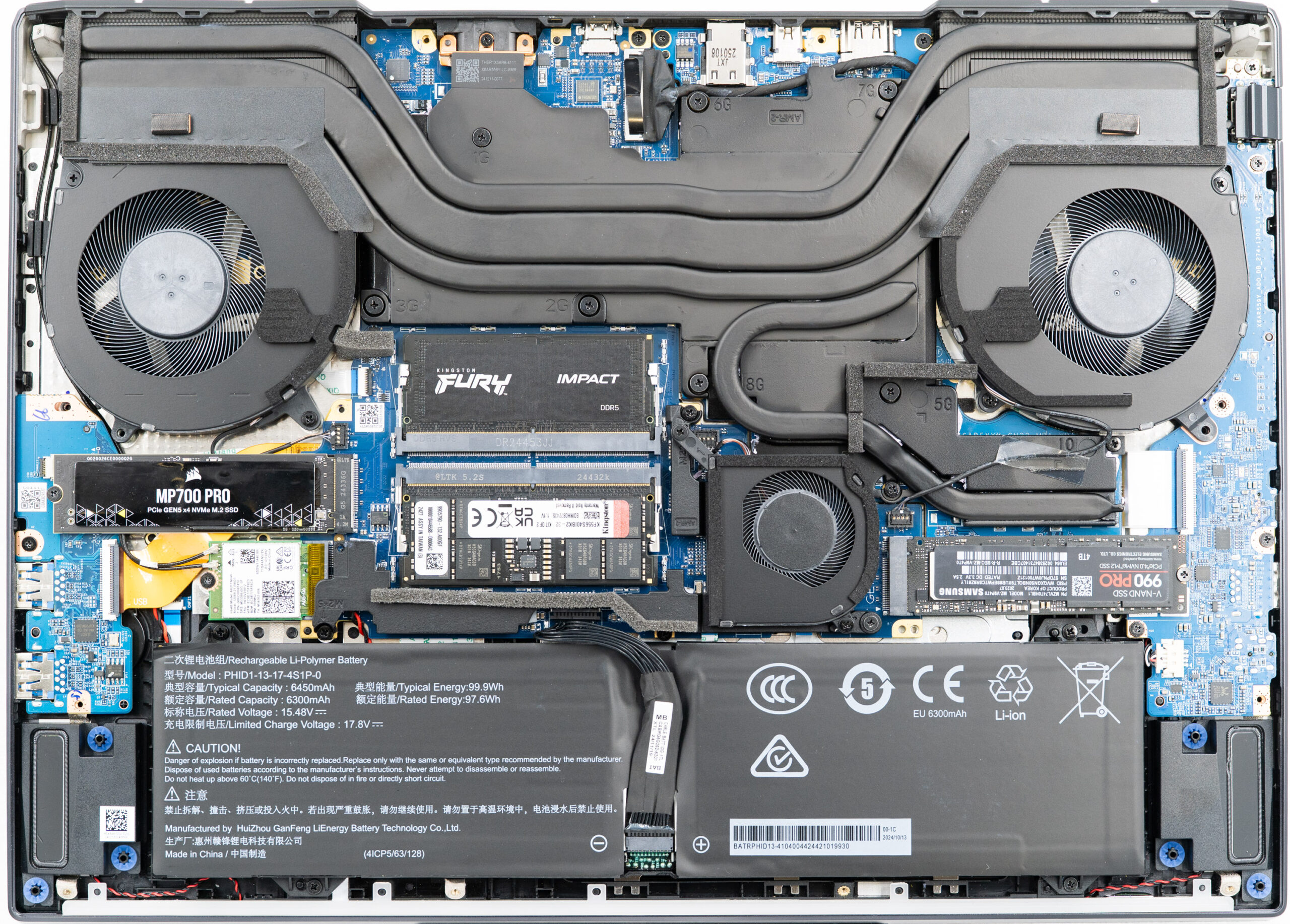
The internal layout of the XMG NEO 16 with Intel and AMD is largely identical, so a single photo is sufficient:
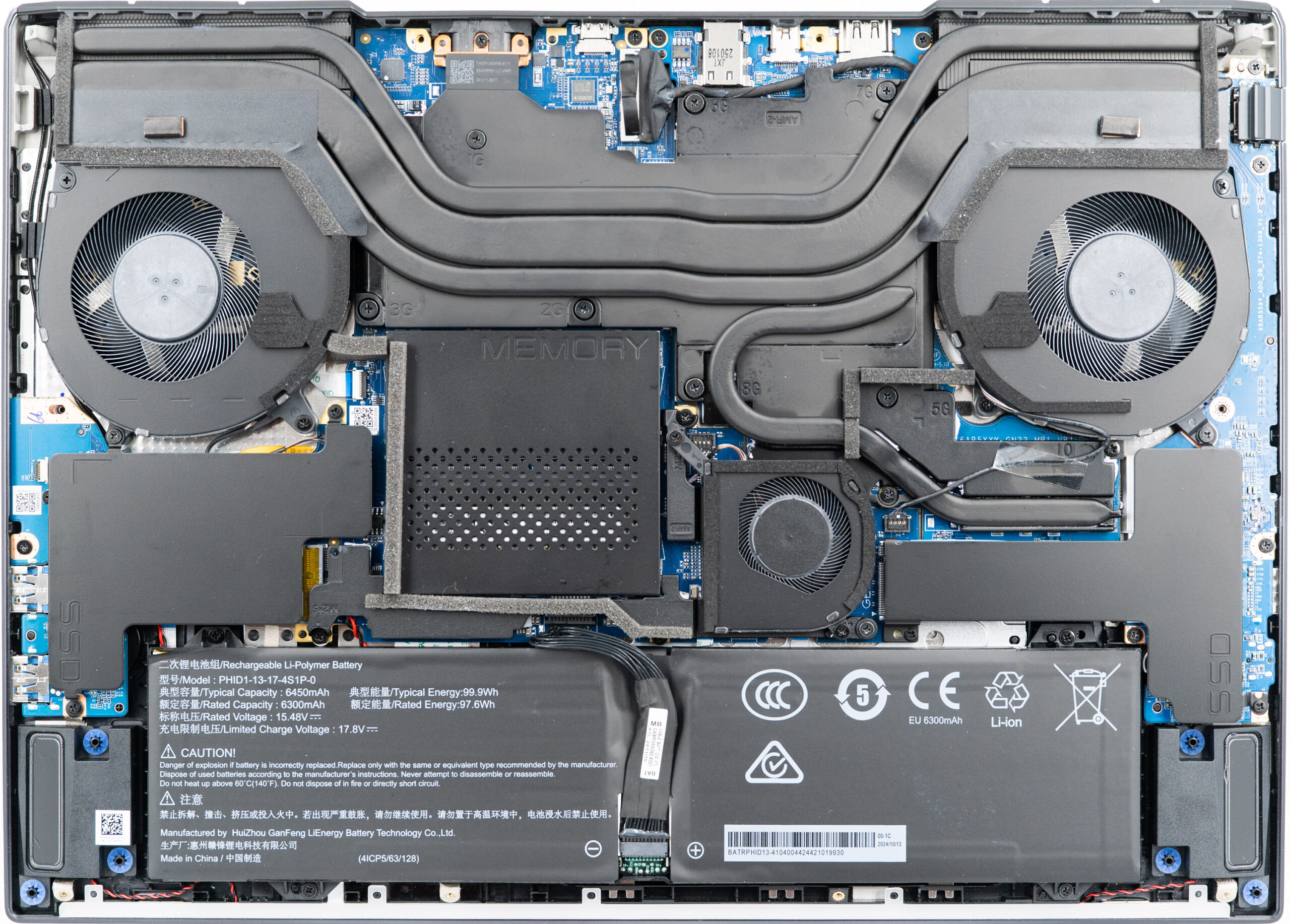
An additional photo with the RAM and SSD heat shields removed is available here. Instructions for removing these heat shields can be found on the respective product pages in our download portal.
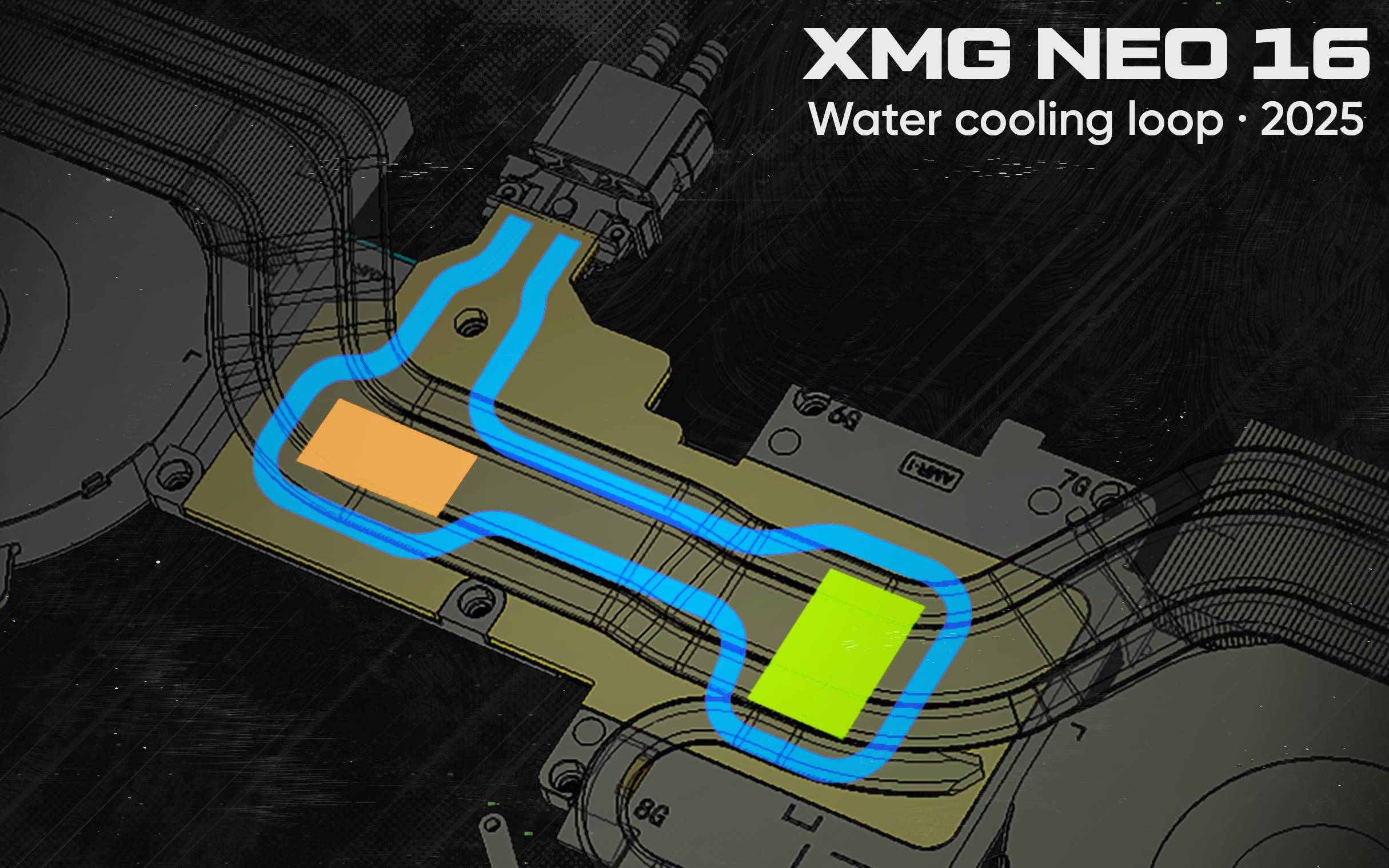
The channel inside the thermal module for the optional XMG OASIS liquid cooling system can be illustrated as follows:
XMG PRO 16
By contrast, the XMG PRO 16 uses a different thermal module – without a water channel:
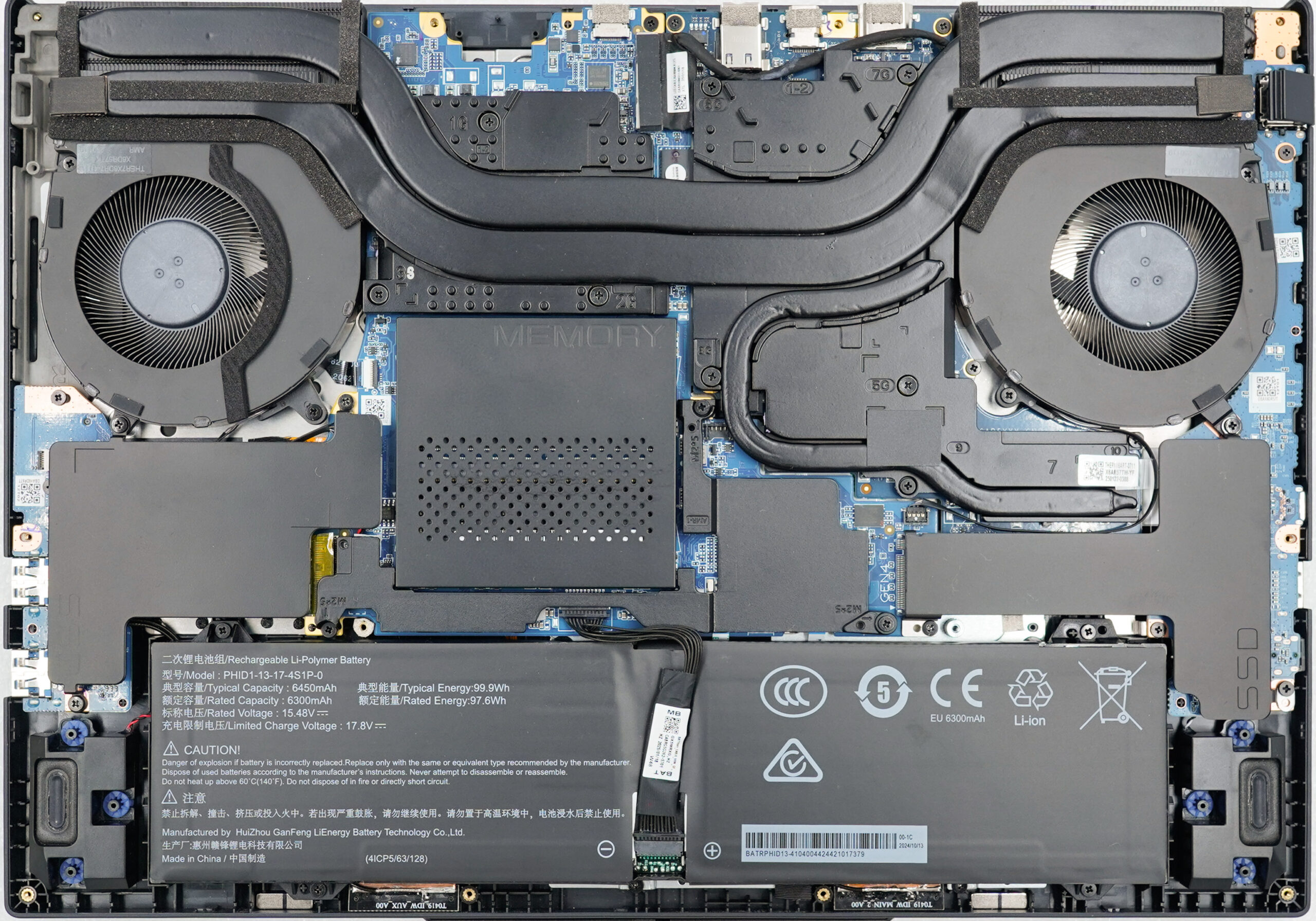
This photo shows the XMG PRO 16 (M25) with RTX 5070 Ti. A photo of the XMG PRO 16 Value Edition (M26) with the third fan will be added later.
The fans and heatsinks in the XMG NEO 16 are 12 mm tall, while the XMG PRO 16 – which is also slightly slimmer overall – uses 10 mm components. This also results in slightly different power limits for CPU-only and combined CPU+GPU load.
Mainboard eco-system
Also, since the E25 generation of XMG PRO and XMG NEO, the GPU board used to be separate from the mainboard:
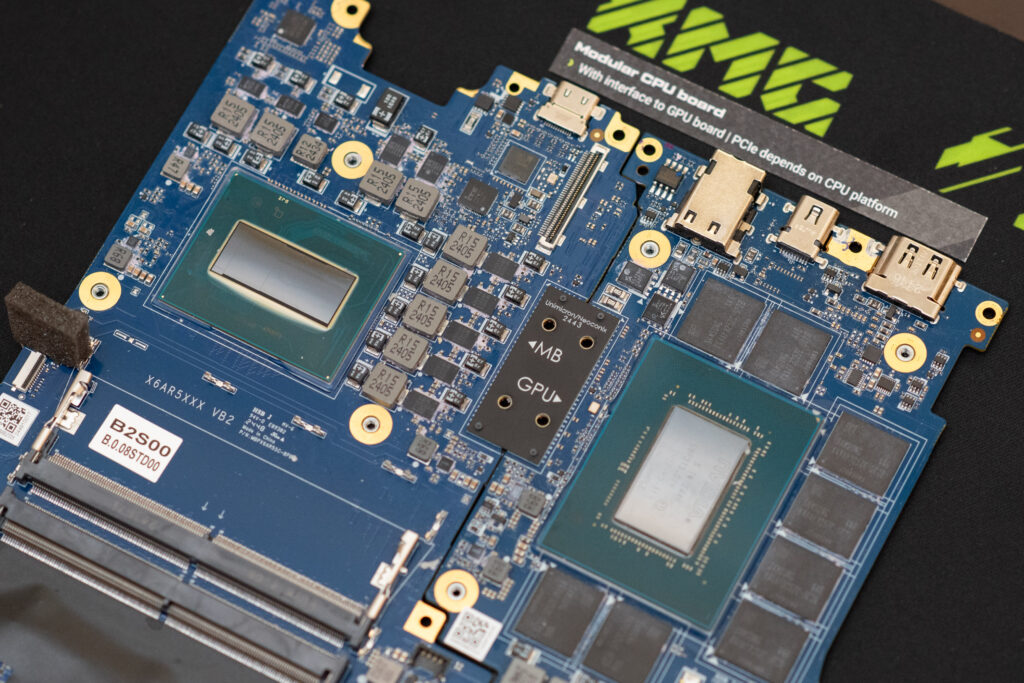
This semi-modular approach supports our product development and is one of the reasons why we can offer XMG PRO and XMG NEO in so many variants. A dedicated article on this motherboard design is available here:
The new XMG PRO 16 Value Edition (M26) is now the first exception to this approach: the new configuration with Core i9-14900HX and GeForce RTX 5070 with 12 GB once again uses a single continuous mainboard.
However, this is not a completely new mainboard architecture. The fundamental layout and the positions of the key components and I/O ports remain consistent with the previous platform. Put simply, the two previously separate PCBs are now permanently connected by a continuous PCB section at the point where the board-to-board connection was previously located.
This change serves to optimise costs for this specific Value Edition configuration. Compared with the previous 8 GB version, the new RTX 5070 with 12 GB increases material costs, including those associated with the additional video memory. The single-piece PCB allows us to offset part of these additional costs without reducing the laptop’s feature set elsewhere.
There are no functional differences in normal operation as a result. The I/O ports and features remain identical, and the system BIOS also remains the same as on the previous M25 Value Edition with Core i9-14900HX.
XMG OASIS: liquid cooling solution for XMG NEO 16
What is the XMG OASIS?
XMG OASIS is an external liquid cooling system for the XMG NEO 16. It supplements the laptop’s internal air cooling with an additional liquid cooling loop: a pump circulates distilled water through a cooling channel integrated into the laptop’s cooling system. The heat absorbed there is then transferred to the surrounding air through the radiator and fan of XMG OASIS.
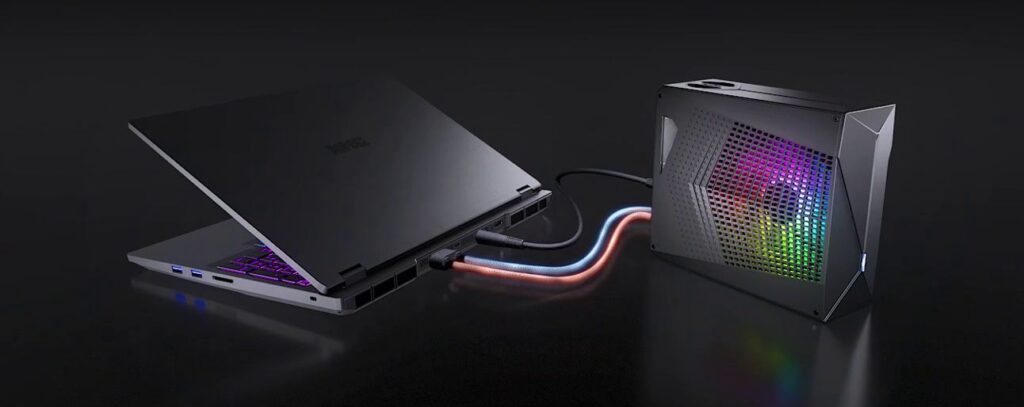
Even without XMG OASIS, the XMG NEO 16 remains a fully-capable air-cooled laptop, designed to sustain the full GPU performance of all available graphics cards. With the top-end GeForce RTX 5080 and 5090, all variants of the XMG NEO 16 already sustain a combined CPU and GPU power of 240 watts on air cooling alone.
XMG OASIS adds another layer of cooling and primarily takes load off the internal fans. With XMG OASIS connected, the XMG NEO 16 (M26) raises its sustained combined power limit to as much as 300 watts while simultaneously reducing temperatures and system noise.
Performance, temperatures and noise levels
How much additional cooling performance XMG OASIS provides depends on the workload. In the following comparisons, we showcase the XMG NEO 16 (A25) with Ryzen 9 9955HX3D alongside the XMG NEO 16 (E25) with Core Ultra 9 275HX, whose design is largely identical to that of the new M26 model. Both systems are equipped with the top-end GPU and are tested with air cooling as well as with XMG OASIS.
Disclaimer: In the tables below, “CPU temperature” always refers to the average across all 16 or 24 CPU cores. In other contexts, CPU temperature is often reported as the hotspot value instead, meaning the hottest measurement point at any given moment.
CPU-only
Under CPU-only load, the benefit varies depending on the platform:
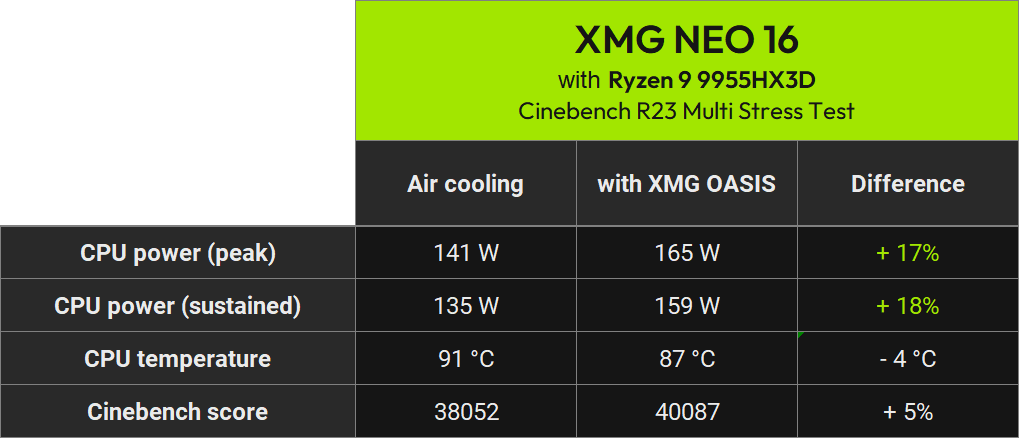
In the sustained Cinebench R23 test, CPU power on the AMD system increases from 135 to 159 W. At the same time, the average CPU temperature drops from 91 to 87 °C, while the Cinebench score increases by only 5%.
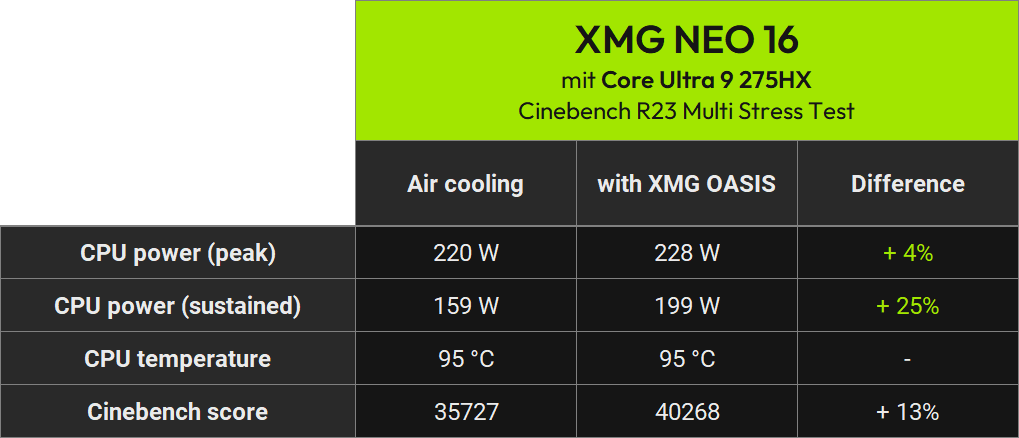
On the Intel system, sustained CPU power increases more significantly from 159 to 199 W. Rather than using the additional thermal headroom to lower temperatures, the CPU converts it into additional performance: the average core temperature remains at 95 °C in both cases, while the Cinebench score rises by around 13% to 40,268 points.
These two results also illustrate why additional electrical power does not translate proportionally into additional computing performance. At 135 W, the Ryzen 9 9955HX3D is already relatively high on its efficiency curve and therefore gains comparatively little extra performance from another 24 W. In this workload, the Core Ultra 9 275HX is able to convert the additional power and thermal headroom into a larger performance gain.
CPU+GPU stress test
The advantage of XMG OASIS becomes even more apparent under simultaneous maximum CPU and GPU load. For this worst-case test, we combine Prime95 with the 3DMark Steel Nomad Stress Test.

Even on air cooling alone, the GeForce RTX 5090 sustains around 173 W in both systems. With XMG OASIS connected, this GPU power is fully maintained while significantly more headroom becomes available for the processor.
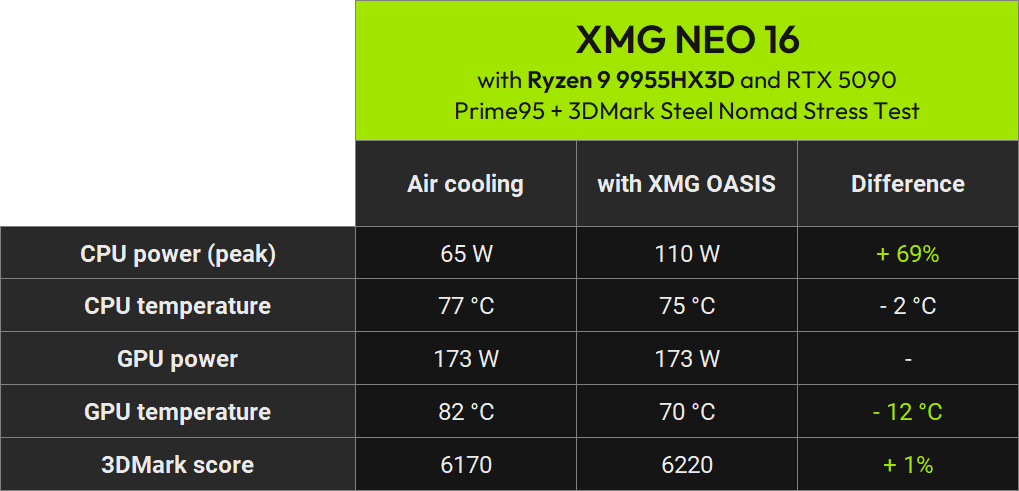
On the AMD system, sustained CPU power increases from 65 to 110 W. At the same time, GPU temperature drops from 82 to 70 °C, while the average CPU temperature decreases from 77 to 75 °C.
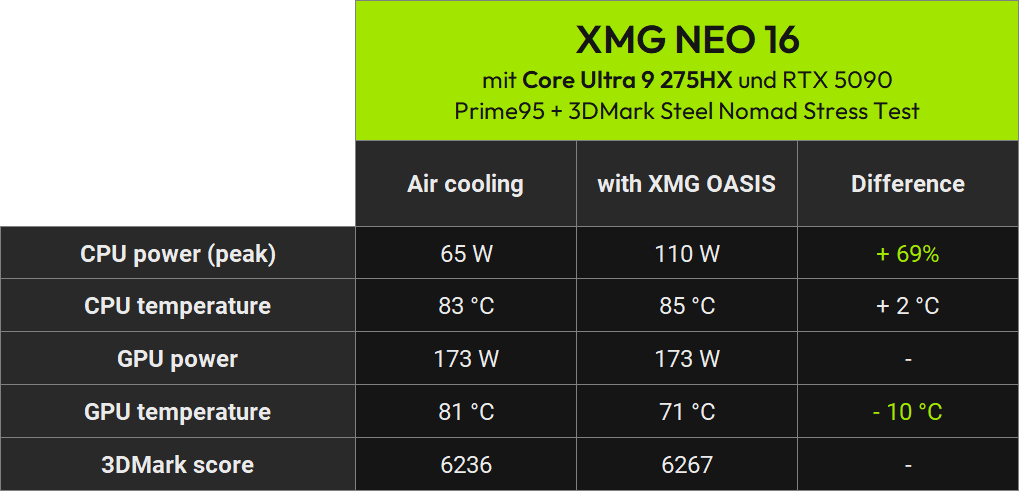
On the Intel system, CPU power likewise increases from 65 to 110 W – an increase of almost 70%. The GPU continues to sustain 173 W while its temperature drops from 81 to just 71 °C. The average CPU temperature rises only slightly from 83 to 85 °C, despite the substantially higher CPU power consumption.
The 3DMark score changes only marginally in this combined test because it continues to primarily reflect GPU performance. The main benefit here is the significantly greater amount of CPU performance available at the same time. This is relevant, for example, for workloads that heavily utilise both CPU and GPU in parallel.
Noise levels
In addition to performance and temperatures, acoustics are a major advantage of XMG OASIS. Even on air cooling alone, the XMG NEO 16 uses large fans with a comparatively low-frequency and therefore more pleasant acoustic profile.
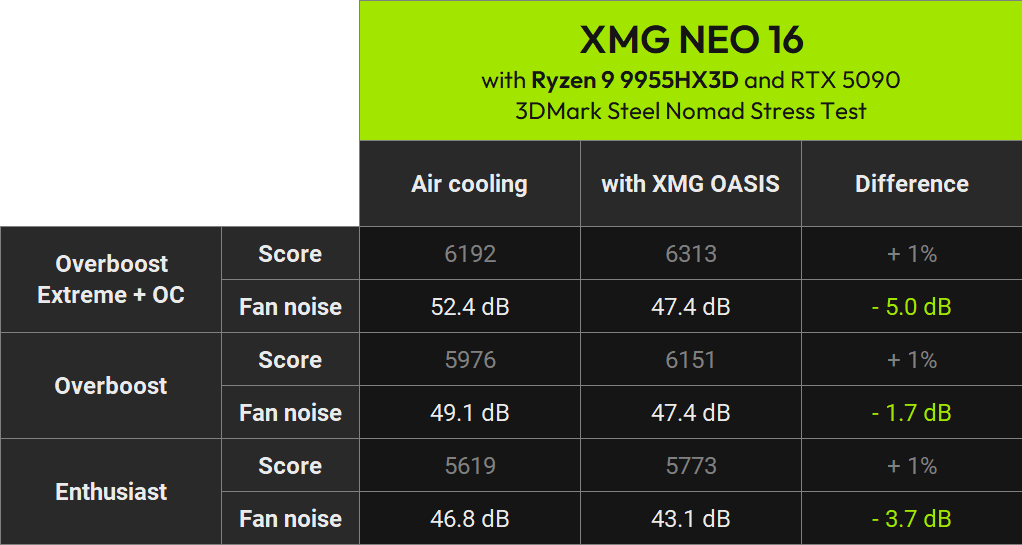
With XMG OASIS connected, a substantial share of the heat is dissipated through the external radiator. This allows the internal fans to run at lower speeds, further reducing the laptop’s noise output.
In our Steel Nomad noise test, for example, the measured maximum noise level in Overboost Extreme drops from 52.4 to 47.4 dB. Noise levels decrease further with XMG OASIS in the lower performance profiles as well.
XMG OASIS on video: setup, operation and FAQs
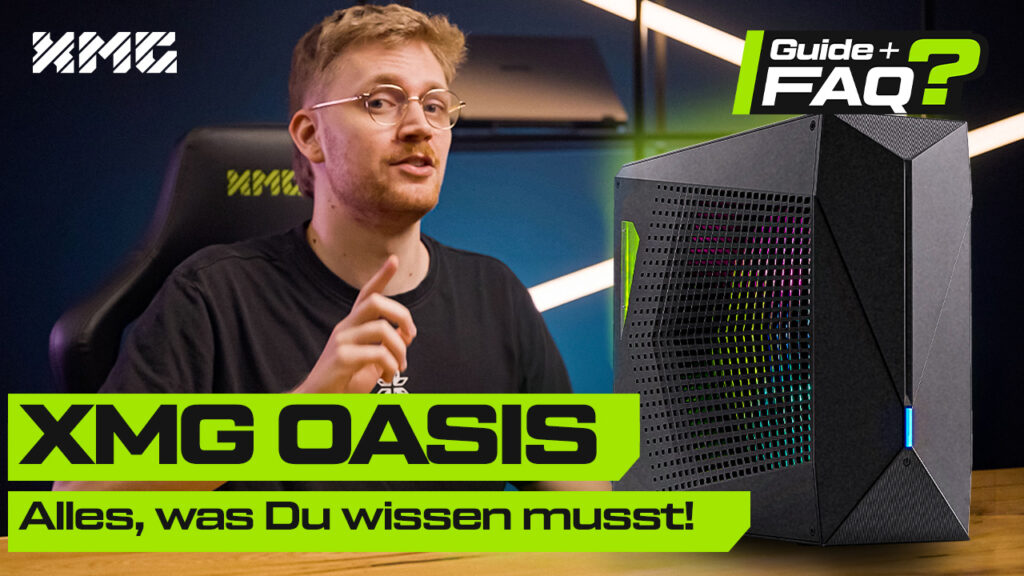
Our latest video provides a detailed walkthrough of how XMG OASIS is connected, filled and used in everyday operation. Among other things, we cover the self-sealing connectors of the current generation, control via the XMG Control Center, disconnecting and transporting the laptop, and the recommended steps for maintaining the liquid cooling loop. We also show and explain the benchmark and noise measurements summarised above in greater detail.
You can find further information in our Help Center:
Other tidbits and fun facts
SSD cooling with PCI Express 5.0
PCI Express 5.0 SSDs are no longer a novelty – even a slim ultrabook such as the SCHENKER ELEMENT 16 now supports these extremely fast drives.
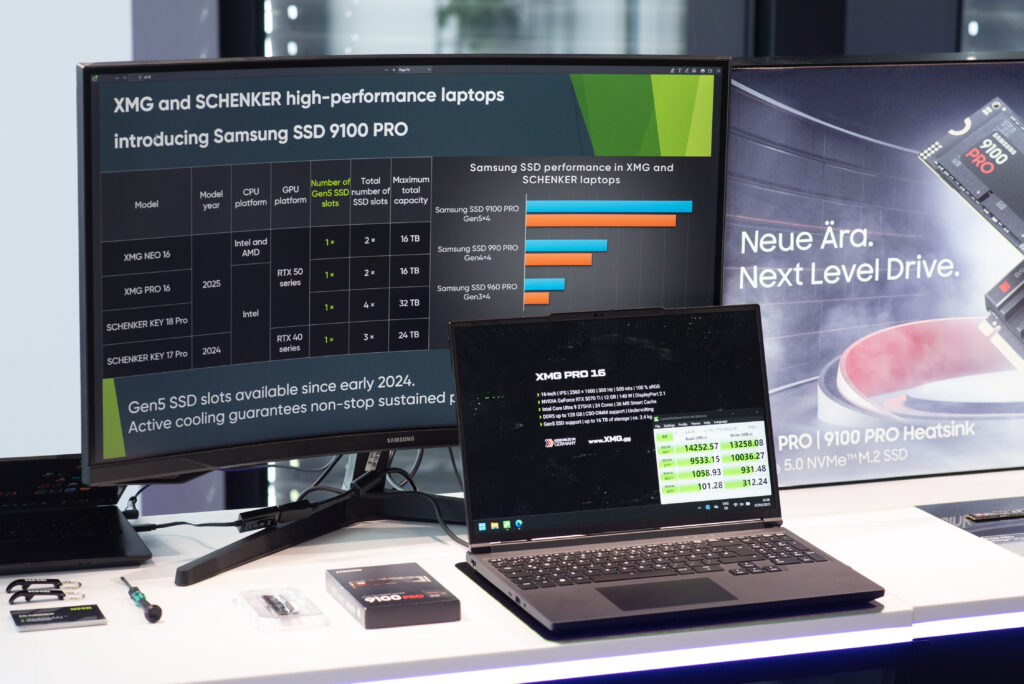
Keeping temperatures low on such flagship SSDs is still as vital today as it was when Gen5 was first introduced. This is why all of our models that support Gen5 SSDs include thermal conductors and connect the SSDs to the inner chassis surfaces using generously sized thermal pads.
In the XMG NEO 16, for example, heat from a Gen5 SSD is transferred via thermal pads and a heat shield to the aluminium bottom case. This spreads the heat across a larger surface area and reduces localised hot spots at the SSD controller. The XMG PRO 16 works similarly, except that its thermal module interfaces with a surface on the inside of the plastic bottom case.
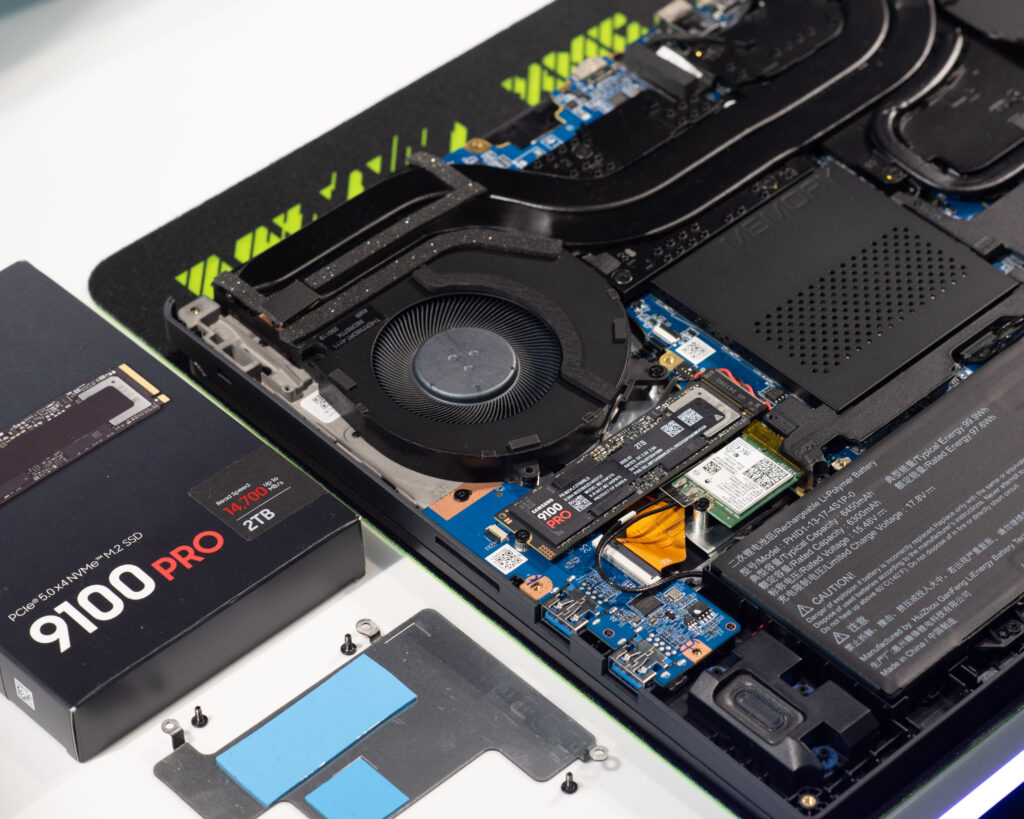
In a ten-minute sustained write test with the Samsung SSD 9100 PRO, our solution maintains a constant write speed without thermal throttling:
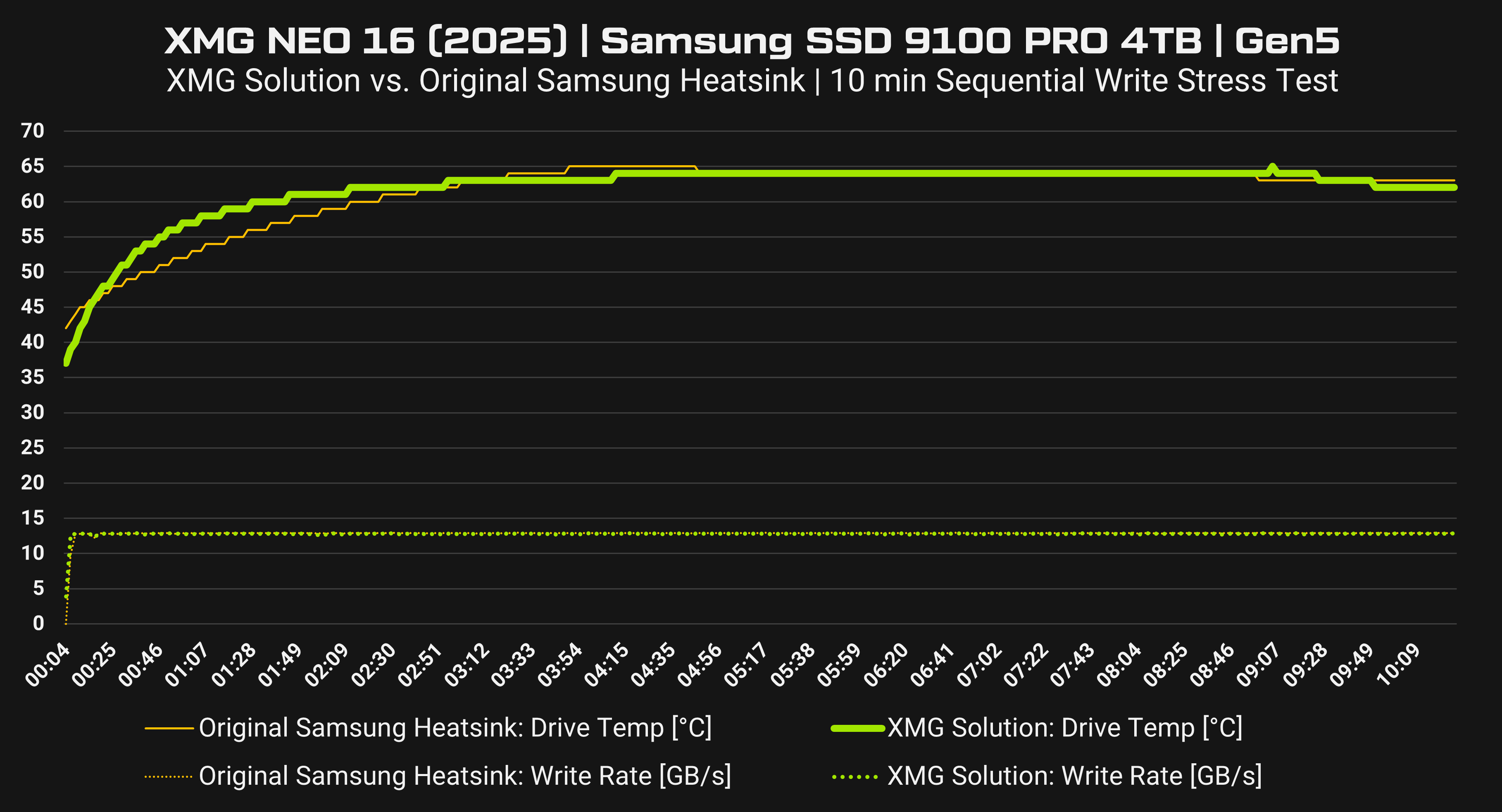
The green graph shows the SSD variant without the Samsung heatsink, but with our own cooling solution inside the closed laptop chassis.
The result: our solution performs on par with the manufacturer’s own solution. Both variants maintain consistently stable write speeds within PCI Express 5.0 specifications without any throttling. The temperature curves converge after just a few minutes and stabilise at an SSD temperature of approx. 64 °C.
Since the CPU generates very little load in this scenario, the laptop fans also remain relatively quiet. Further information is available in this FAQ article:
Tuning options
The XMG PRO 16 and XMG NEO 16 support the following features across all currently available laptop variants:
- Preconfigured performance profiles from Balanced to Overboost.
- Creation of a manual performance profile with user-defined CPU and GPU power limits, including adjustment of PL1, PL2 and PL4, or SPL, sPPT and fPPT.
- Manual control of the MUX switch, switching between MSHybrid, iGPU-only and dGPU-only.
- Option to disable TPM 2.0.
- Option to disable Secure Boot.
- Automatically enabled support for virtualisation technologies.
- Setup of hardware encryption with compatible SSDs.
Those features apply to both AMD and Intel. The following table, however, shows the options in which the Intel and AMD platforms differ:
| XMG NEO (A25) with AMD | XMG PRO (M25) and XMG NEO (M26) with Intel |
|---|---|
| Supported: ✅ Factory-level optimization of PBO (Precision Boost Overdrive) in cooperation with AMD, including tuning of TDC and EDC. ✅ Standard frequency/voltage curve in compliance with AMD guidance. ✅ Automatic support for DDR5-5600 CL46 (SO-DIMM). ✅ Options to disable the second CCD (Core Chiplet Die). ✅ Options to disable SMT (Simultaneous Multithreading). ✅ Manual adjustment of the CPU Curve Optimizer (undervolting).* ✅ Options to adjust memory clock speeds and latencies* *marked options are only available since BIOS N.1.12A10 with AMD. Not available: ❌ Options to to load XMP/EXPO profiles. ❌ Manual tuning of PBO, TDC, or EDC. ❌ RAID setup. | Supported: ✅ Manual undervolting via BIOS setup. ✅ Option to disable Undervolt Protection to allow undervolting via Windows software. ✅ Manual tuning of memory clock speeds and latencies. ✅ Manual loading of XMP profiles. ✅ Individual core configurations, e.g., disabling specific E/P cores or all E cores. ✅ Predefined profiles with AC Loadline tuning. ✅ Automatic support for DDR5-5600 CL46 (SO-DIMM). ✅ Automatic support for DDR5-6400 CL52 (CSO-DIMM).* ✅ Setup of RAID arrays, especially RAID 1. *marked options only apply to variants with Intel Core Ultra 9 HX-series, i.e. not to the i9-14900HX in XMG PRO 16 (M25). |
Length of power cable
The XMG NEO with RTX 5080 and RTX 5090 is supplied with a 420-watt power adapter. This power level is required with RTX 5080 and RTX 5090 to cover the maximum intended combined power limits when using XMG OASIS, as liquid cooling enables higher power consumption when the CPU and GPU are under load simultaneously.
This charger has a relatively short cable of only 80 cm length, spanning from the power brick the the laptop’s power input port. The AC cable on the other side of the brick is modular and variable – we ship with a 1.8 m cord out-of-the-box.
The shorter DC cable is required to ensure sufficiently stable current delivery. This is particularly necessary because the cable is effectively extended when used together with XMG OASIS:
- The 420-watt power adapter connects to XMG OASIS.
- A DC extension cable connects XMG OASIS to the XMG NEO.
- Power from the 420-watt adapter is delivered through XMG OASIS to the laptop.
Alternatively, we offer smaller power adapters with lower wattages and longer DC cables. The following table compares all recommended and supported chargers:
| Model Number | Dimensions | Weight (with AC cord) | DC cable length | |
|---|---|---|---|---|
| 150 W USB-C | FSP150-APDBR01 | 113.5 x 64.5 x 23 mm | 466 g | 1.5 m |
| 240 W | FSP240-ACBU3 FSP250-ACBU3 | 127 x 71 x 25.6 mm | 611 g | 1.2 m |
| 330 W | FSP330-ACAU3 | 165 x 75.6 x 25.8 mm | 751 g | 1.2 m |
| 420 W | FSP420-ACAU3 | 178.5 x 81.6 x 27 mm | 834 g | 80 cm |
Remarks:
- With air cooling, the smaller 330-watt power adapter is 100% sufficient under full CPU and GPU load – including in “Overboost” mode.
- The even smaller 240-watt power adapter should instead be used in “Enthusiast” mode. In Overboost mode under full CPU and GPU load, it would be overloaded and switch off, causing the laptop to switch to battery power. In “Enthusiast” mode, however, the adapter can be fully utilised.
Our recommendation:
- Install the original 420-watt charger permanently at your main workstation with a sufficiently long AC cord.
- Buy a second power adapter with lower wattage, lower weight and a longer cable for mobile use.
Further information is available in this article:
Wi-Fi 7 and the XMG NEO 16 with AMD
The XMG NEO 16 (M26) and XMG PRO 16 Value Edition (M26) support Wi-Fi 7. For the other Intel-based variants of the XMG PRO 16, Wi-Fi 7 is available as an upgrade depending on the configuration.
The XMG NEO 16 (A25), by contrast, supports Wi-Fi 6E, including the 6 GHz band. An upgrade to Wi-Fi 7 is not supported on this model generation. This limitation does not only apply to the factory-installed wireless module; replacing it with a Wi-Fi 7 module is not supported either:
- The AMD platform does not boot with Intel Wi-Fi 7 BE200.
- Modules based on MediaTek MT7925 do not achieve the intended Wi-Fi 7 operation on this platform.
This limitation stems from the specific platform integration and regulatory certification of the wireless solution. Consequently, we do not plan to introduce Wi-Fi 7 support for the XMG NEO 16 (A25). Its existing Wi-Fi 6E solution remains more than capable for current routers and high-speed internet connections.
Frequently asked questions
Is there also a refresh planned for the XMG NEO 16 (A25)?
There is no refresh planned for the XMG NEO 16 (A25) within the current product generation.
The model will remain unchanged in the line-up and continue to be produced as-is. It will not receive a new generational designation or be rebranded.
The reason is simple: AMD has not announced a successor or refresh for the Ryzen 9 9955HX and Ryzen 9 9955HX3D. Both processors remain AMD’s current flagship CPUs in this class. The available NVIDIA graphics cards are also identical to those in the XMG NEO 16 (M26).
The Intel-based M26 introduces two specific changes:
- the new Core Ultra 9 290HX Plus
- the new OLED display, which is only compatible with the Intel platform
Neither can be carried over to the AMD model. The XMG NEO 16 (A25) therefore remains the current AMD variant – there will be no purely cosmetic rebranding to a 2026 generational designation. The XMG NEO 16 (M26) exclusively replaces the previous Intel-based E25 model.
Why is there no XMG NEO 17 anymore?
The feature set and performance class of the XMG NEO will remain exclusive to the 16-inch chassis for the foreseeable future, as this is globally the chassis size most in demand among customers for high-performance laptops. For users who prefer a larger display and do not mind the additional weight, however, we are now planning to launch a new XMG PRO 18. All information:
Technically, the model is largely based on the XMG PRO 16 platform, but combines it with a larger chassis and several additional features. The regular version is planned with an Intel Core Ultra 9 290HX Plus, GeForce RTX 5070 Ti and a 300 Hz IPS display with 2560×1600 pixels. A Value Edition with a Core Ultra 7 270HX Plus, GeForce RTX 5070 with 12 GB VRAM and a 180 Hz display is also in development. Both variants feature, among other things, a larger four-speaker sound system, a larger glass touchpad, a 99 Wh battery and a comparatively slim chassis for the 18-inch class.
Pricing and the final availability date will only be announced at the official launch – expected before the end of September 2026.
Configure and buy
XMG NEO 16 (2025) with AMD and Intel can be configured and ordered at bestware:
The following content documents the status of previous product, firmware, and driver phases from 2025. It is retained for transparency purposes but is no longer relevant for current purchasing decisions.
Distribution of pre-orders: GPU and CPU configurations
10 April 2025: The following graphic illustrates the approximate quantity ratio of our current pre-orders for XMG NEO 16 (2025) in two pie charts. These values represent a snapshot in time and will likely shift in the coming weeks and months.
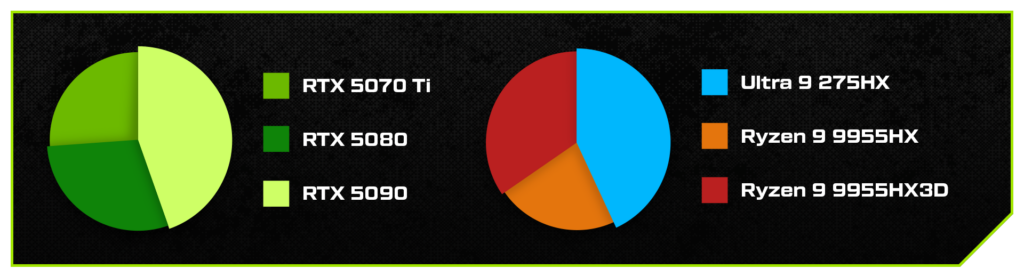
On the left side, you can see how the orders are distributed across the available GPU options. Currently, the RTX 5090 is in the lead – a typical picture at the start of a new generation. Many early adopters had been specifically waiting for the top-tier model and planned their purchase accordingly. As the product cycle progresses, the ratio often shifts in favour of the ‘mid-range’ models.
The diagram on the right shows the share of the various CPU variants in the pre-orders to date. If you add both AMD options together, AMD is currently in the lead overall. However, since the AMD Ryzen 9 9955HX3D is not yet shipping, Intel has a slight lead in the current production batch. The quantity ratios also have a corresponding effect on the production planning at our ODM partner. We expect the ratio to shift further once all variants are consistently available. A more detailed breakdown of the combinations of CPU and GPU variants is not intended for publication – we apologise for any inconvenience.
Current status of G-SYNC and NVIDIA Advanced Optimus
Last update: August 29, 2025
What has happened so far
Since late 2024, we have been working with NVIDIA to make G-SYNC and NVIDIA Advanced Optimus (DDS) available for the current XMG NEO generation. Due to the shared components, there were also plans to extend support to XMG PRO.
After a long debugging phase on NVIDIA’s part, we received working drivers and firmware for extended validation testing for the first time in July 2025.
At the same time, we checked whether the features could also be transferred to devices that had already been delivered. This would require BIOS, VBIOS, driver and additional panel firmware updates. Upgrading the LCD panel firmware is a key requirement for supporting G-SYNC and NVIDIA Advanced Optimus.
Major obstacle
Unfortunately, the firmware update mechanism for LCD panels proved to be unreliable in practice. Transmission errors occurre too often via the eDP upstream channel and are able to cause displays to become unusable due to corrupt firmware. In internal tests, this occurred so frequently that this update method cannot be approved for end-user use.
Background: Firmware updates for laptop panels are not normally intended, as the microcontrollers on the panels are usually only supposed to perform very narrowly defined basic tasks, which should no longer require firmware updates after series production. More complex tasks and variables, on the other hand, are handled by the laptop’s control system (or its motherboard) and its graphics driver. Because firmware updates for eDP panels are virtually unheard of in practice, the panel manufacturer currently in use unfortunately does not offer a particularly robust software-based update mechanism.
A hardware-based update (removing the panel and writing to the EEPROM chip built into the panel using an SPI tool) would be theoretically possible, but is not practical in the field – and is not supported by the panel manufacturer for security reasons.
We discussed many potential ways with the panel manufacturer to make the update process via software (via the eDP cable) more reliable, but did not come up with a practical solution.
This made it clear that retroactive activation on existing devices would not be responsible.
Decision
This left us with two options:
- Option A: Introduce G-SYNC and Advanced Optimus only for newly manufactured laptops.
- Option B: Refrain from doing so altogether as long as there is no solution for existing customers.
Option A would have had several disadvantages:
- XMG PRO and XMG NEO exist in numerous variants (with different CPU, GPU and display combinations), which are reproduced at different times. Introducing it only for individual newly produced models would have led to a very confusing and difficult to coordinate process.
- With two different equipment levels (devices with and without G-SYNC), hardware and firmware variants and possible error patterns would have almost doubled. This would have complicated support and warranty handling, and increased the risk of delays or failures for all customers.
- All buyers who purchased their XMG NEO before this date would have been permanently excluded from the feature, while later customers would have benefited from it. We felt this would be unfair, especially to those who placed their trust in us by making an early purchase decision.
After lengthy internal discussions, we therefore decided on option B.
This means that there will be no rollout of G-SYNC and Advanced Optimus for the 2025 generation of XMG PRO and XMG NEO – neither for devices already delivered nor for future new orders. We will continue to evaluate these features for future generations with new CPU or GPU architectures, but they are no longer planned for this year.
We did not take this decision lightly. We regret the delays and any inconvenience this may cause. Customers who placed orders between February and March with G-SYNC applications have already been compensated. Nevertheless, we would like to apologise to all those who had hoped until the very end that there would still be a subsequent G-SYNC upgrade for XMG NEO (2025). We hope that this update will at least provide clarity.
Fundamental difficulties
The validation of G-SYNC and NVIDIA Advanced Optimus has always been challenging in recent years. NVIDIA only begins the approval process once the final hardware samples are available. For us as an OEM, this means that the process often starts very late and is difficult to plan due to bottlenecks in NVIDIA’s validation pipeline. As a result, we have repeatedly had to delay the start of production of a new product generation simply because the required firmware for G-SYNC and Advanced Optimus was not yet available.
This year, the situation was particularly difficult: not only did validation start late, but it was also hampered by unexpected compatibility and reliability issues. This significantly prolonged the entire process.
We are learning from these experiences: in future, we will rely less heavily on proprietary features that are still undergoing third-party certification or validation at the time of launch being available on time. This will be particularly the case when we have little insight into the third-party provider’s schedules.
Review / Chronicle
- 27 February 2025: Launch of the XMG NEO 16 (A25/E25) including promotion of NVIDIA G-SYNC and NVIDIA Advanced Optimus
- 28 March 2025: Promotion of G-SYNC and Advanced Optimus was cancelled before the first units were shipped, and previous pre-order customers were informed by email. A discount or cancellation was offered. The background to the situation was explained here in this article.
- 10 April 2025: Launch of the XMG PRO 16 (E25) – we never advertised this model with G-SYNC and we never made any public statements suggesting that subsequent support was planned.
- April to June 2025: We confirmed at regular intervals that work on the feature was still ongoing. In the meantime, we expressed confidence that validation would be possible in principle, but at the same time emphasised that we could not give a formal guarantee before validation was complete.
- July 2025: We received a working firmware update package from NVIDIA for the first time. In the course of this, tests began to determine the extent to which already produced units could be updated retrospectively. In the course of this, it became apparent that the firmware update process on the LCD panel was becoming a seemingly insurmountable bottleneck.
- 29 August 2025: Final rejection – G-SYNC and Advanced Optimus will no longer be introduced for XMG NEO.
What difference will G-SYNC still make in 2025?
All 2025 generation XMG laptops are equipped with fast displays ranging from 240 to 300 Hz.
Compared to older 60 or 144 Hz displays, the difference with or without Adaptive Sync is much less significant at such high refresh rates. The higher refresh rate ensures that the image is updated much more frequently and that each scene is displayed with very low latency (almost no delay). This reduces input lag – the time between input and visible response.
Tearing (the visible splitting of the image, see Wikipedia article) can still occur even at high refresh rates. However, this artefact is much less noticeable on 300 Hz panels – you only see the image fragments for an extremely short time because each refresh cycle is so short.
Even if the frame rate drops (e.g. to 40-50 FPS in demanding games, which is about the lower limit of playability), the gaming experience on a 240- to 300-Hz display still feels stable and relatively smooth compared to older monitors.
Technologies such as G-SYNC remain technically useful optimisations, but at 300 Hz, the lack of VRR is noticeably less distracting.
Tips and tricks
Disable Optimus
For the best possible gaming experience on your laptop monitor, we recommend disabling NVIDIA Optimus. This can be done either via the Control Center or the BIOS setup. Disabling requires a restart.
- With Optimus enabled, the image output runs through the iGPU, which usually limits refresh rates to 240 Hz due to bandwidth constraints.
- With Optimus disabled, output runs directly through the NVIDIA GPU, allowing the full 300 Hz of the laptop screen to be utilised. In addition, the overall latency of the system is reduced because the screen content does not have to be routed through the iGPU first, thus measurably reducing input lag, especially in fast-paced games.
External monitors
NVIDIA G-SYNC and AMD FreeSync are supported on external monitors by all XMG laptops, regardless of the model generation and whether the screen in the laptop itself supports G-SYNC. For an optimal gaming experience with NVIDIA G-SYNC, we recommend connecting an external monitor to one of the laptop I/O ports that are connected to the NVIDIA dGPU. In the case of XMG PRO and XMG NEO (2025), this applies to the HDMI and Mini DisplayPort I/O ports. For monitors with DisplayPort input, we offer a corresponding adapter.
Other NVIDIA and display topics
Mini-LED: No Adaptive Sync with Intel (but FreeSync with AMD)?
Current situation
30 April 2025: At the time of the last update, it was still unclear whether VESA Adaptive Sync could be used instead of NVIDIA G-SYNC. It is now clear that
- VESA Adaptive Sync is not supported in XMG NEO 16 (E25) with Intel Core and Mini-LED. The option is disabled (greyed out) via an OEM-adjusted Intel graphics driver.
- The option is greyed out by a modified Intel graphics driver. Thanks to the ‘Extended INF’ mechanism, this modification will also be applied to subsequent WHQL driver updates.
If Intel Adaptive Sync is forced (e.g. by reinstalling with an unsupported Intel graphics driver), this may cause temporary image artefacts on the Mini LED panel, which can persist even after Adaptive Sync has been disabled and even after restarting the device. We therefore strongly recommend against forcing Intel Adaptive Sync.
This limitation only affects the Mini LED panel in XMG NEO 16 (E25). The limitation only applies to Intel. AMD FreeSync is supported in XMG NEO 16 (A25) with AMD Ryzen on both panels offered. We are currently quite confident that the upgrade to NVIDIA G-SYNC will be available soon. Once the upgrade is available, there will be no need for Adaptive Sync with Intel.
Previous statement (archive)
Editorial note: Statements that are now obsolete have been crossed out.
10 April 2025: VESA Adaptive Sync (also known as ‘VRR’) is not directly supported by NVIDIA on laptop displays. Adaptive Sync can only be used when the laptop display is connected to the iGPU (AMD/Intel) via NVIDIA Optimus (MSHybrid). In this case, the NVIDIA graphics card can also be used for tearing-free rendering, but the images are output via iGPU.
At present, it has not yet been conclusively clarified whether Adaptive Sync can be supported. Support is not limited to the question of whether Adaptive Sync can be activated, but whether we can guarantee smooth operation. We are working with our technology partners to resolve this issue with utmost priority. As soon as we have more information, we will communicate it immediately.
PCIe interface to the NVIDIA GeForce RTX 50-series Laptop GPU
19 June 2025: The BIOS update has been released. The section has been updated with new information. Comments on PCIe Gen4 have been reworded from the present tense to the past tense.
6 June 2025: a BIOS update for XMG NEO 16 (A25) with PCIe Gen5 x8 support is currently in pre-release state. The update has been shared with review media and users on our Discord server. A wider release is expected within the next 1-2 weeks.
29 May 2025: initial publication.
Introduction
We originally announced PCIe Gen5 x8 as the interface for the dedicated graphics card in XMG NEO (2025). XMG NEO 16 (E25) with Intel Core Ultra 9 275HX did indeed offer this PCIe speed for the NVIDIA GeForce RTX 50-series Laptop GPUs since initial shipment.
The situation was different for XMG NEO 16 (A25) with AMD Ryzen 9 9955HX/3D: At the start of initial delivery, operation with Gen5 x8 was still in the validation phase, so the model was initially limited to Gen4 x8 via BIOS.
BIOS update for XMG NEO 16 (A25) with AMD
This validation has since been successfully completed. The upgrade to PCIe Gen5 x8 for XMG NEO 16 (A25) is now available in the form of a BIOS update.
This BIOS update also brings additional CPU and RAM tuning options, which are described in more detail here. The ZIP file of the BIOS update contains a README.TXT file with update instructions and further information.
We recommend that all owners of the XMG NEO 16 (A25) install this BIOS update. Newly shipped units will come with this update pre-installed from around the end of June 2025.
With the installation of BIOS N.1.12A10, the following sections become obsolete.
What were the practical implications of Gen4 speed for GPU performance?
To illustrate whether the PCIe Gen4 x8 connection in the AMD-based XMG NEO created a performance bottleneck, we show a series of worst-case benchmarks and comparisons in the following table:
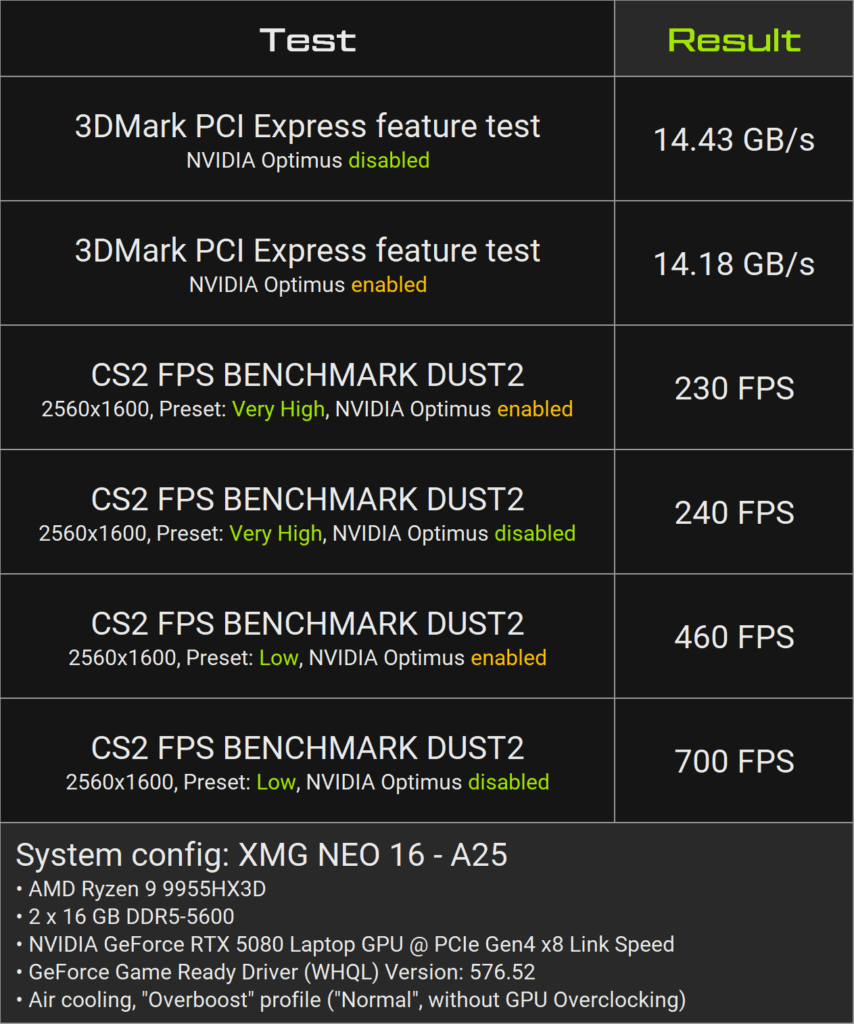
The table shows:
- The PCIe throughput in the ‘3DMark PCI-Express Feature Test’ was within the expected range for Gen4 x8.
- In Counter-Strike 2 with the lowest preset, the system achieved remarkably high frame rates – especially with NVIDIA Optimus disabled. The high FPS implicates a high throughput of CPU/GPU communication, which represents a worst-case scenario for PCIe utilisation.
- With NVIDIA Optimus enabled, the FPS drops to around 460 – still a very high value, with the primary bottleneck being NVIDIA Optimus.
- In the ‘Very High’ preset with lower PCIe utilisation, CS2 ran at over 200 FPS. The difference between NVIDIA Optimus enabled and disabled was still measurable here, but relatively small.
To put these figures into context, we would like to point out the following:
- For e-sports titles where you want the highest possible FPS, disabling NVIDIA Optimus is recommended anyway, as this also measurably reduces potential input lag. This also reduces PCIe utilisation. See this analysis by Jarrod’s Tech.
- XMG NEO 16 (A25) with AMD Ryzen 9 9955HX3D achieved higher average FPS despite the Gen4-limited GPU interface – in particular, it achieved higher ‘1% lows’ than a comparable device with Intel Core Ultra 9 275HX and Gen5 GPU connection, as this video from GizmoSlipTech shows.
Addendum: PCI Express bandwidth had no effect on the number, maximum resolution, or refresh rate of external monitors. Monitor bandwidths are defined solely by the GPU interfaces, not by the communication between the CPU and GPU.
General background about PCI Express utilisation
The PCI Express interface is primarily used in graphics cards to exchange data between the CPU and GPU – primarily so-called ‘draw calls’, i.e., instructions for displaying objects, textures and effects in a 3D scene. These instructions are regenerated every frame and sent to the GPU. Therefore, the utilisation of the PCIe interface increases primarily with the number of real images per second (FPS), not with the pure image quality or rendering complexity.
Important to understand: The actual calculation and output of the images takes place in the GPU itself. When NVIDIA Optimus is disabled or an external monitor is connected (see HDMI and Mini DisplayPort in XMG NEO 2025), the finished images are output directly from the GPU to the monitor – not sent back to the CPU or iGPU via PCIe.
The PCIe interface is therefore not primarily responsible for transferring finished frames, but for controlling the GPU via the CPU.
Image quality improvements – such as higher resolution, more complex shaders, anti-aliasing or ray tracing – do not usually significantly increase the utilisation of the PCIe interface, as these effects are calculated internally by the GPU.
Accordingly, the actual PCIe bandwidth used grows significantly slower with each GPU generation than the raw performance of the GPU itself.
Conclusion
The GPU connection via PCIe Gen4 x8 in XMG NEO 16 (A25) with AMD Ryzen did not pose a significant disadvantage in real-world usage. Gaming performance remained at an extremely high level even in e-sports titles with high PCIe utilisation. Typical single-player scenarios were generally not affected by this limitation either, as PCIe utilisation tends to decrease rather than increase at high resolutions or high image quality due to the reduced number of draw calls.
On-going GPU performance discussion
19 June 2025: NVIDIA has released GeForce Game Ready Driver – WHQL Driver Version 576.80. We do not yet know whether this driver brings significant performance improvements. However, we still recommend that all customers install this driver.
26 May 2025: NVIDIA driver version 576.52 from 19 May appears to have improved GPU utilisation in games. We expect further detailed reviews and comparisons. NVIDIA currently releases a new graphics driver about every two weeks, so further selective improvements can be expected.
13 May 2025: After a review by Jarrod’s Tech, titled “Is This a Joke? 5090 vs 4090 Laptop Comparison in 25 Games“, we have posted a commentary statement in this thread:
Please refer to that statement and do not hesitate to join the discussion either on Reddit or in the “XMG NEO – A25 & E25” channel on our Discord server. We are looking forward to your feedback!
NVIDIA GPU remains active after load (issue with Optimus sleep mode)
19 June 2025: paragraph updated with now better working iGPU Power Saving Mode.
30 April 2025: initial publication.
With recent drivers, NVIDIA Optimus’ power-saving mode may not fully work properly:
- After a cold start, the dedicated NVIDIA GPU is initially switched off correctly (GPU power: zero watts).
- As soon as a game or benchmark is started, the GPU activates itself – so far, so good.
- Problem: After exiting the game, the GPU remains active and continues to consume power – even when idle. This also has a negative impact on the CPU package power, as the PCIe lanes remain active.
Workaround: To measure power consumption correctly when idle or during battery testing, we currently recommend to enable the “iGPU Power Saving” mode in Control Center and perform a reboot.
Behaviour:
- “On”: The NVIDIA GPU is consistently put into sleep mode as long as no external monitor is connected, regardless of which software is running.
- “Off”: Standard behaviour of NVIDIA Optimus – any application can activate the dGPU.
- “Auto”: Same as ‘On’, but only in battery mode.
Please note:
- For best experience, please update to the latest BIOS version and Control Center version from our download portal. Also, install the latest NVIDIA driver from NVIDIA’s website.
- Control Center does not explicitly state that enabling this mode requires a reboot. However, in our testing, we found that a reboot will yield in lower overall power consumption after enabling this mode.
Other NVIDIA driver issues
NVIDIA graphics card sometimes remains at lowest possible power stage
26 May 2025: Driver version 576.52 from 19 May appears to have improved this issue but has not completely resolved it yet. However, it seems to occur very rarely outside of our synthetic benchmark scenarios.
5 May 2025: Paragraph has been rephrased with some additional clarifications.
13 May 2025: Title of paragraph has been modified from “does not reach maximum power consumption” to “remains at lowest possible power stage”
A bug in the latest NVIDIA GPU driver affects all current RTX 50-series models, including RTX 5070 Ti, 5080, and 5090. The issue prevents the GPU from reaching full power in some cases. This leads to a major drop in performance (roughly 40%, perhaps more) compared to expected results.
This issue is not limited to XMG laptops, it also affects other brands and vendors.
You don’t need to guess whether your system is affected. The difference is obvious. Either the GPU runs at full performance, or it runs at roughly half power. There’s no in-between.
If the bug happens, it always happens at the very start of a game or benchmark. If your game launches and performs well, it will stay that way until you close it. It won’t start throttling mid-session. That makes it easy to spot and test. You don’t need to keep checking during gameplay.
We’ve reported the issue to NVIDIA and are waiting on a fix. In the meantime, the known workaround still helps: while the game or benchmark is running, use our hotkey button to switch once through all three performance profiles (Balanced → Enthusiast → Overboost). This should restore normal power levels during the same gameplay session.
Despite this bug, we continue to ship systems with the latest NVIDIA WHQL driver for broader stability and compatibility.
Generally shipping with the latest NVIDIA graphics driver
Despite the above-mentioned problems, we are generally shipping with the latest WHQL driver, as these generally offer greater stability in games. The generally somewhat unfortunate situation with NVIDIA graphics drivers is reported in many places in the press.
Important information about DDR5 memory
Caution with DDR5-5600 Kingston FURY Impact for AMD Ryzen 9 9955HX/3D
6 June 2025: added new picture link.
26 May 2025: initial publication.
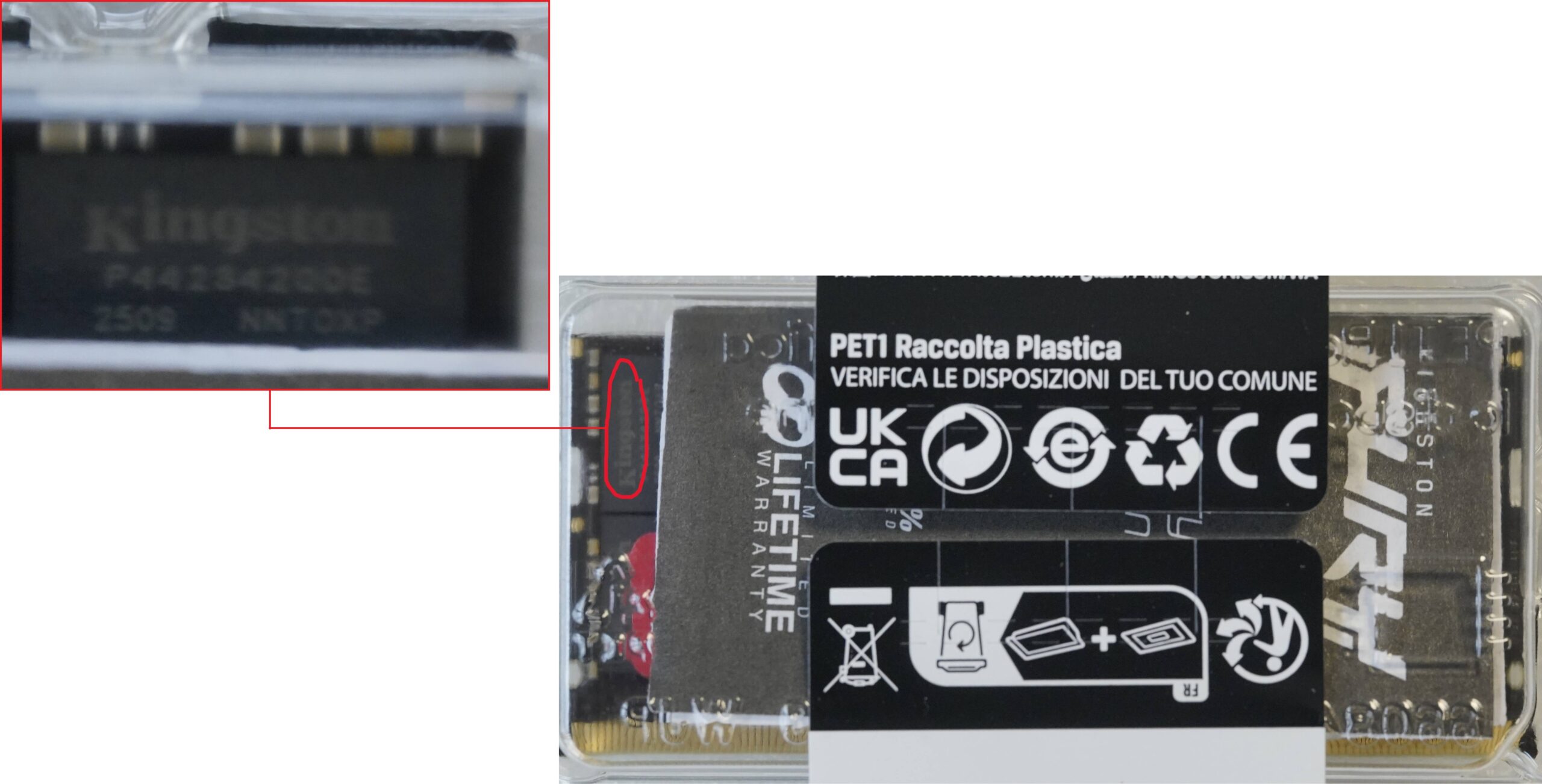
We normally offer Kingston FURY Impact with 5600 MT/s CL40. However, it has since become apparent that Kingston uses different DRAM ICs on these modules without changing the primary part number.
Explanation of terms:
- IC = Integrated Circuit: This refers to the square components on the RAM modules.
- DRAM = Dynamic Random Access Memory: a general term for the architecture of these components.
Visual difference:
The modules with Kingston ICs can often be identified before unpacking by a logo on the DRAM components. See picture:
The following part numbers are affected, among others:
- 16 GB / KF556S40IB-16
- 32 GB / KF556S40IB-32
Compatibility:
- If these modules are equipped with DRAM ICs from SK Hynix, they will work perfectly in all tested models.
- However, if they are equipped with DRAM ICs from Kingston, they will not work in XMG NEO 16 (A25) with AMD Ryzen 9 9955HX/3D. With these modules, the laptop cannot start at all (screen remains black).
- They will still work with Intel or other AMD platforms (e.g. the Ryzen 9 8845HS in XMG CORE 15), but not with AMD Fire Range.
Since the modules with Kingston ICs use the same part number, it is not easy for distributors and suppliers to store these modules separately.
We have reported this incompatibility to both Kingston and AMD. However, we cannot predict whether there will be a solution, such as through an AGESA/BIOS update. This incompatibility will likely need to be resolved between Kingston and AMD first.
In practice, this means:
- For all orders of XMG NEO 16 (A25) with Kingston FURY Impact memory, we ensure that only modules with SK Hynix ICs are installed.
- Due to current difficulties in obtaining sufficient supplies of Kingston FURY Impact with SK Hynix ICs, we have removed out-of-stock capacities from XMG NEO 16 (A25/AMD) configurator.
- Customers who wish to upgrade the RAM in their XMG NEO 16 (A25/AMD) themselves should exercise caution. Before installation, check whether Kingston ICs are installed on the modules. If this is the case, we recommend returning the memory.
For clarification: Kingston FURY Impact modules with Kingston ICs are not defective. According to our tests, they are currently simply not compatible with the AMD Ryzen 9 9955HX/3D series. They are still perfectly suitable for models with other CPUs, regardless of whether they have ICs from SK Hynix or Kingston. We also assume that the performance will be identical with established compatibility, as both DRAM IC types follow the same specifications.
Availability of DDR5-6400 CSO-DIMM for Intel Core Ultra 9 275HX
Sometimes we have minor bottlenecks in the CSO-DIMM supply for Intel Core Ultra 275HX. But RAM supply is generally a moving target and not related to the general availability of XMG PRO and XMG NEO. In other words: RAM shipments are small and frequent, usually arriving just-in-time. If you see any notice in our only ship regarding DDR5 CSO-DIMM availability, these notices most likely apply only to new orders, not to previously placed pre-orders. In the unlikely case that a DRAM bottleneck affects a previous order, we would inform individual customers by e-mail.
Memory upgrade to 128 GB with Intel Core Ultra
10 April 2025: For XMG NEO 16 (E25) with Intel Core Ultra 9 275HX, we now offer the option of expanding the memory to up to 128 GB DDR5-5600.
As we currently only have a limited number of these memory modules available, allocation will be in the order in which upgrade requests are received. Customers are kindly requested to inform us of their upgrade request by email – simply reply to our last email or to your order confirmation. The difference in price can be found in the configurator in the shop.
| Possible upgrade | Current status |
|---|---|
| 2 × 64 GB DDR5-5600 with Crucial CT64G56C46S5 | Validation in XMG NEO 16 (E25) with Intel is complete. Upgrades can be ordered immediately. The availability of the modules is still limited, but we will be able to serve the first customers with these modules. |
| 2 × 64 GB DDR5-6400 with Crucial CT64G64C52CS5 | We have requested samples from Crucial but do not yet have a timeline for when they will arrive. From a technical standpoint, there are currently no known issues that would prevent future compatibility. However, we will only be able to give a specific outlook as soon as we have sufficient samples. We do not offer this configuration at the moment. |
Are RAM configuration higher than 96 GB foreseeable with AMD Ryzen?
30 April 2025: AMD has now responded to our enquiry. We have provided AMD’s development partners with 2 × 64 GB module samples. However, it is currently unclear whether these efforts will lead to official 128 GB support in the future.
28 March 2025: These upgrades are not foreseeable with AMD Ryzen 9 9955HX(3D) because AMD specifies the maximum memory capacity of the CPU as 96 GB. Source: spec sheet (open link, click ‘Expand all’, Ctrl+F: 96). An attempt to install our 2 × 64 GB modules resulted in the system failing to boot (‘no boot’ situation). A request to AMD as to whether the previously validated 96 GB configuration really represents the actual maximum for this CPU generation Ryzen 9055 series (‘Fire Range’) has so far remained unanswered.
Inconsistent write speed with SSD Samsung 9100 PRO on AMD Ryzen 9 9955HX/3D
19 June 2025: Issue has been fixed with BIOS N.1.12A10 for XMG NEO 16 (A25) with AMD, see download portal.
6 June 2025: BIOS update is currently in the testing phase. Release is planned for the next 1–2 weeks.
26 May 2025: We are working on a solution in the form of a BIOS update.
19 May 2025: Initial publication.
In write stress tests with single files larger than 1GB, the Samsung 9100 PRO showed reduced write speeds (~2 GB/s) on Fire Range platforms. Read speeds were unaffected. Daily tasks like gaming, app installs, file browsing, and smaller file transfers performed normally. Even in the worst case scenarios, file transfers write speeds at 2 GB/s were still pretty usable.
This issue has been fixed via BIOS N.1.12A10 for XMG NEO 16 (A25) with AMD, see download portal. XMG NEO 16 (E25) with Intel was never affected by this issue in the first place. The rest of this paragraph remains published for archival purpose.
Test Conditions:
- Samsung 9100 PRO Gen5 SSD on AMD Ryzen 9 9955HX / 9955HX3D (Fire Range)
- Windows 11 24H2
- Various AMD chipset drivers, both older and latest
- BIOS default settings, RAID off
- BitLocker on/off – no impact
Notes:
- Issue only appeared in synthetic write benchmarks and large file copies, usually starting at 1GB file size.
- No temperature issues – SSD remains cool under load.
- Performance peaked near 14 GB/s in some scenarios, confirming no hardware bottleneck.
- Reproduced across multiple units and SSDs.
- Did not occur with other Gen5 SSDs, nor on Intel platforms.
Status:
Issue has been fixed via BIOS update.