




























































Windows 11 continues to receive regular major feature updates – most recently version 26H2. In this article, we provide an overview of the current status at XMG & SCHENKER and highlight what you need to bear in mind when updating or reinstalling Windows.
Introduction
Windows 11 was launched in 2021 and has since received major updates roughly once a year – most recently Windows 11 26H2. These major version updates are named after their release year, such as “26H2” for the second half of 2026. They often introduce new features, but as with all major software updates, they may also bring new bugs or compatibility issues. Therefore, it can sometimes be advisable to wait a little before installing such major updates.
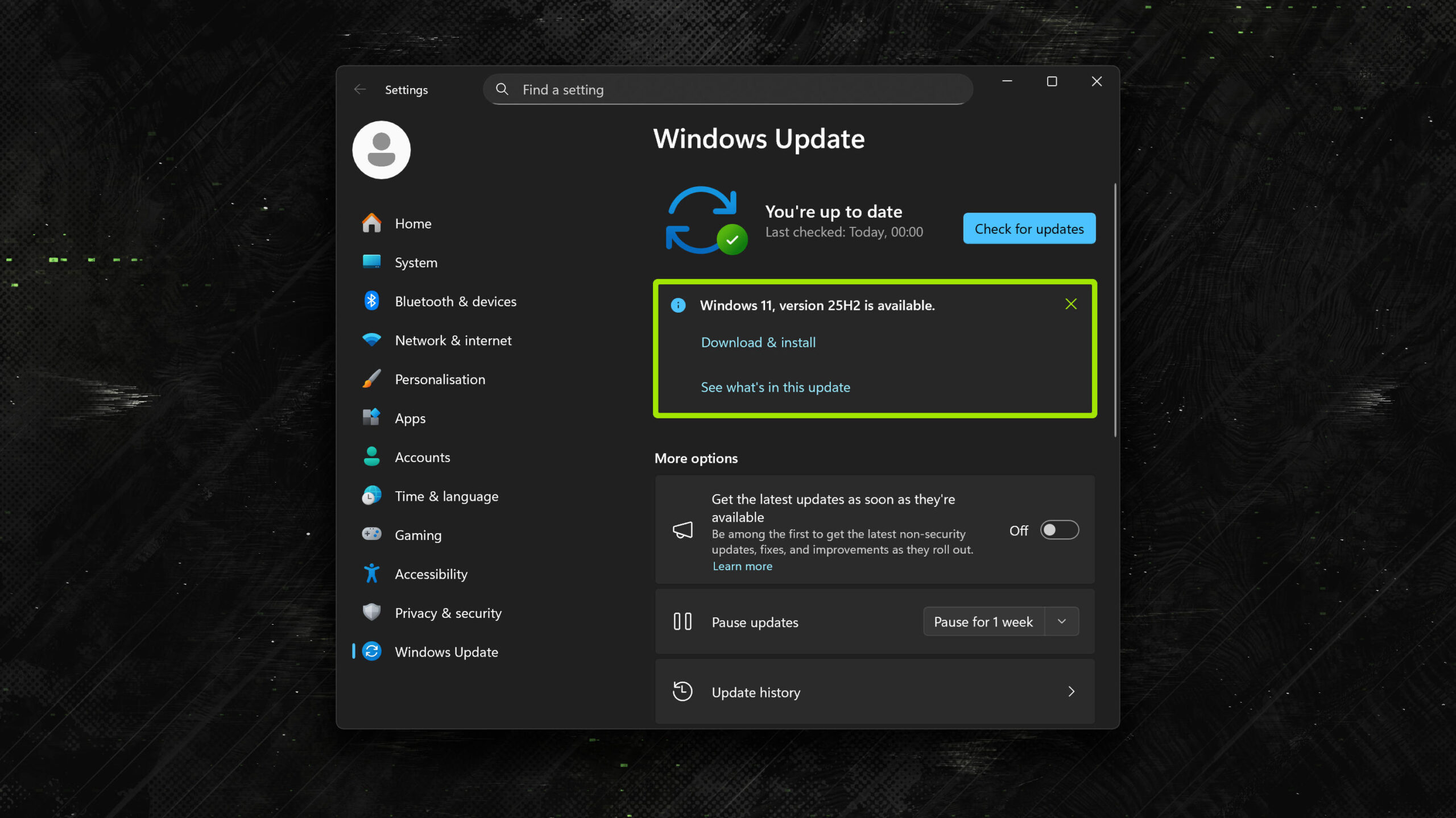
How substantial is the update to 26H2?
For anyone already running an up-to-date installation of 24H2 or 25H2 with all standard recommended updates, 26H2 will be a comparatively small update, as it is based on the same codebase as 24H2 and 25H2. By comparison, the transition from 23H2 to 24H2 in mid-2024 represented a much more substantial change due to quite a bit of significant refactoring under the hood.
Microsoft explains this in a blog post:
Windows 11, version 26H2 is delivered as an enablement package for eligible devices running Windows 11, versions 25H2 and 24H2.
An enablement package is a lightweight update that activates new features already included in the operating system through previous monthly servicing updates. Because versions 26H2, 25H2, and 24H2 share a common servicing branch and underlying codebase, many of the components required for version 26H2 are already present on devices before the feature update becomes available.
This approach enables a significantly faster update experience compared to a traditional operating system upgrade. For eligible devices, installation is similar to a monthly update, requiring only a small download and a quick restart to transition to Windows 11, version 26H2.
Source: How to get the Windows 11 2026 Update (Windows-Blog)
How long will I continue to receive security updates for an older release?
Users can manually trigger a major update after its release. Later, it will be automatically offered via Windows Update. However, there is no immediate urgency to update, as Microsoft continues to provide security updates for older versions. A full overview of supported versions and their end-of-support dates can be found here:
Based on Microsoft’s official information, the situation for Windows 11 Home and Pro is as follows:
| Version | End of Support |
|---|---|
| Version 26H2 | Support ends in October 2028 |
| Version 25H2 | Support ends in October 2027 |
| Version 24H2 | Support ends on October 13, 2026 |
| Version 23H2 or older | Support has already ended |
Anyone still running 24H2 or older should therefore update as soon as possible, as support will end this month. Users of 25H2 still have a year of support before they need to update.
(An interim version called “26H1” also exists – however, this is exclusive to Windows on ARM and therefore not intended for Intel/AMD PCs and laptops with x86 CPUs.)
How do I know which version I am running?
The quickest method:
- Win+R: winver
Alternatively:
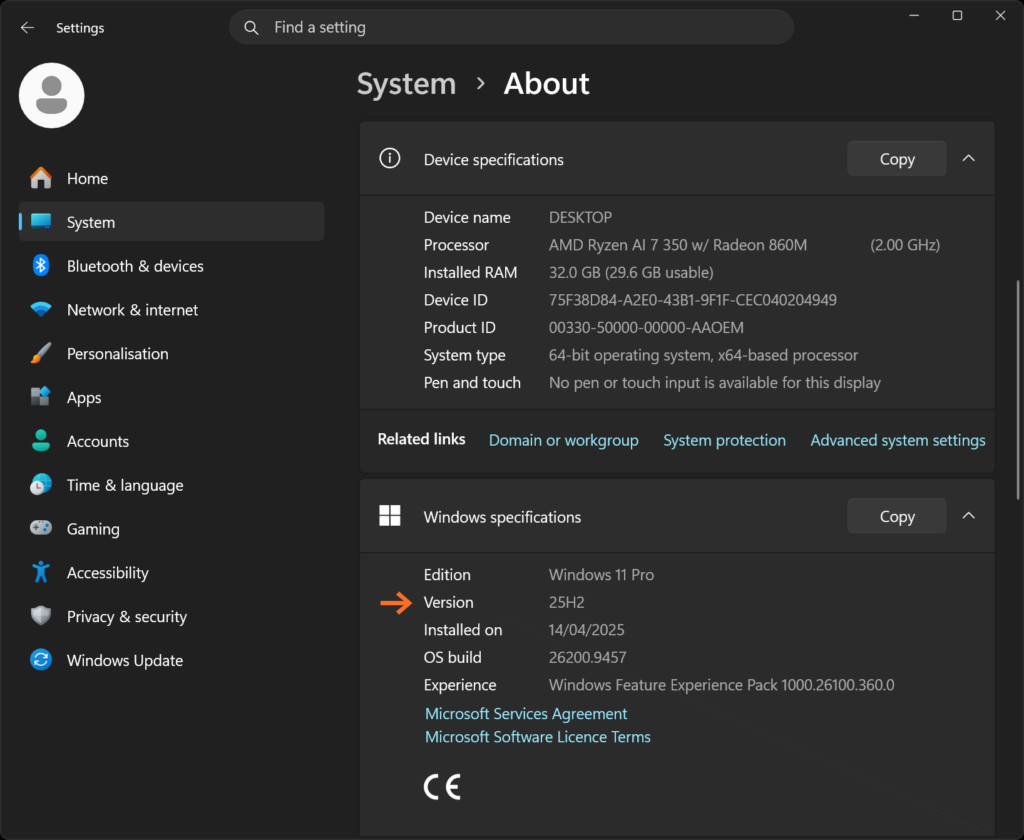
- Start menu → Settings → System → About
The “About” page contains information about your hardware configuration. Scroll down a little further and you will also find the installed Windows version, as shown in this screenshot:
Potential issues with Windows 11 25H2 and 26H2
Microsoft documents known issues with Windows 11 25H2 and 26H2 on the following pages:
- Windows 11, version 25H2 known issues and notifications
- Windows 11, version 26H2 known issues and notifications
Here, we summarise our assessment of the most important points:
| Problem | Status | Description |
|---|---|---|
| Issues with certain USB audio devices | Partially fixed | Certain USB Audio Class 1.0 devices may fail to start or produce no sound under Windows 11 26H2. Possible symptoms include error code 10 in Device Manager, volume controls not working or certain audio settings being unavailable. Some multi-channel audio issues have already been fixed through an out-of-band Windows update, while other symptoms are still under investigation (Source). |
| Domain trust relationship may be lost | Partially fixed; workaround available | In certain enterprise environments, devices protected by Credential Guard may lose their secure connection to an on-premises Active Directory domain after the update. This particularly affects systems on which Machine Identity Isolation has been enabled even though the domain controllers are not yet running Windows Server 2025 Domain Functional Level or higher (Source). |
| Black screen or desktop does not load after sign-in | Partially fixed; workaround available | In certain virtual desktop environments, a black screen may appear after sign-in or the Windows desktop may fail to load automatically. Microsoft has observed the issue primarily on Azure Virtual Desktop (AVD) with FSLogix and certain existing user profiles. As a temporary workaround, explorer.exe can be started manually (Source). |
Last update: October 2, 2026
Regardless of the specific issues officially documented, major Windows upgrades can occasionally result in problems that are difficult to isolate, for example due to older drivers, third-party software or system configurations accumulated over a long period of time (example). If such issues cannot be reasonably isolated after a version upgrade, a clean Windows reinstall may get the system back into a working state faster than lengthy troubleshooting.
Should I already update to Windows 11 26H2?
There are currently no documented 26H2-specific known issues that did not already occur under 25H2. Nevertheless, the release has only been generally available for a short time. Users running Windows 11 25H2 who prefer a more conservative approach to feature updates therefore do not need to switch immediately: Windows 11 25H2 Home and Pro will continue to receive security updates until October 2027.
Our primary concern here is always system stability. In the worst case, feature updates or larger generational changes can cause crashes or impair basic functionality under certain, hard-to-predict software and hardware configurations. As long as there is no immediate need to update, it may therefore be worthwhile to wait a few months until Microsoft has collected, analysed and resolved the resulting bug reports.
If Windows proactively offers you the 26H2 update in the Windows Update dialogue, you can still decline it for now. Simply click the “X” in the update notification or select a button such as “Skip” or “Decline”.
Users who generally prefer a more conservative approach to updates can disable the option “Get the latest updates as soon as they’re available”. See screenshot:

Disabling this setting means that feature updates, which may potentially introduce instability, will no longer be installed automatically immediately after release. Important security updates, which generally do not cause stability issues, will continue to be delivered without restriction. When the currently installed Windows version approaches its end of support, any outstanding feature updates or major releases will also be triggered automatically.
Should I upgrade “in place” or perform a clean install instead?
Under normal circumstances, a direct upgrade via Windows Update should not cause any problems.
However, anyone who is still running Windows 11 23H2 or older, or who generally has not installed updates for several months or years, may be better off with a clean Windows reinstall. Skipping several updates can sometimes result in issues that are very difficult to isolate afterwards – especially if the system also contains a lot of third-party software or outdated drivers. In such cases, a clean reinstall can often be faster than lengthy troubleshooting.
Windows 11 26H2 is not being offered to me yet
Microsoft is rolling out Windows 11 26H2 gradually over a period of several months. If the update is not yet being offered on a compatible system, this is perfectly normal. We recommend that users on 25H2 simply wait and leave Windows Update enabled as usual – the update will arrive eventually.
Pre-installed systems: Current status at XMG & SCHENKER
We are currently still shipping all systems with Windows 11 25H2. Our pre-installation already includes the regular feature and security updates released since 25H2, up to a specific cut-off date.
We are planning to switch our pre-installation to 26H2 in the future, but no date has been set yet.
As soon as the user starts up their desktop PC or laptop, further security updates are installed. Windows Update then continuously and automatically provides the system with all subsequent updates.
Languages available during initial setup
As part of the transition to 25H2 last year, we have reduced the number of pre-installed languages from 12 to five: German, English, French, Italian and Spanish.
This applies exclusively to the dialogues during the initial setup, such as the dialogue for entering the Wi-Fi password, assigning a username and selecting privacy settings. Once the initial setup is complete, assuming an Internet connection is established, users can select additional languages within the normal Windows Settings dialogue and set them as the display language – without any restrictions.
The restriction therefore does not affect Windows’ fundamental language support, but only the language selection directly upon first start-up.
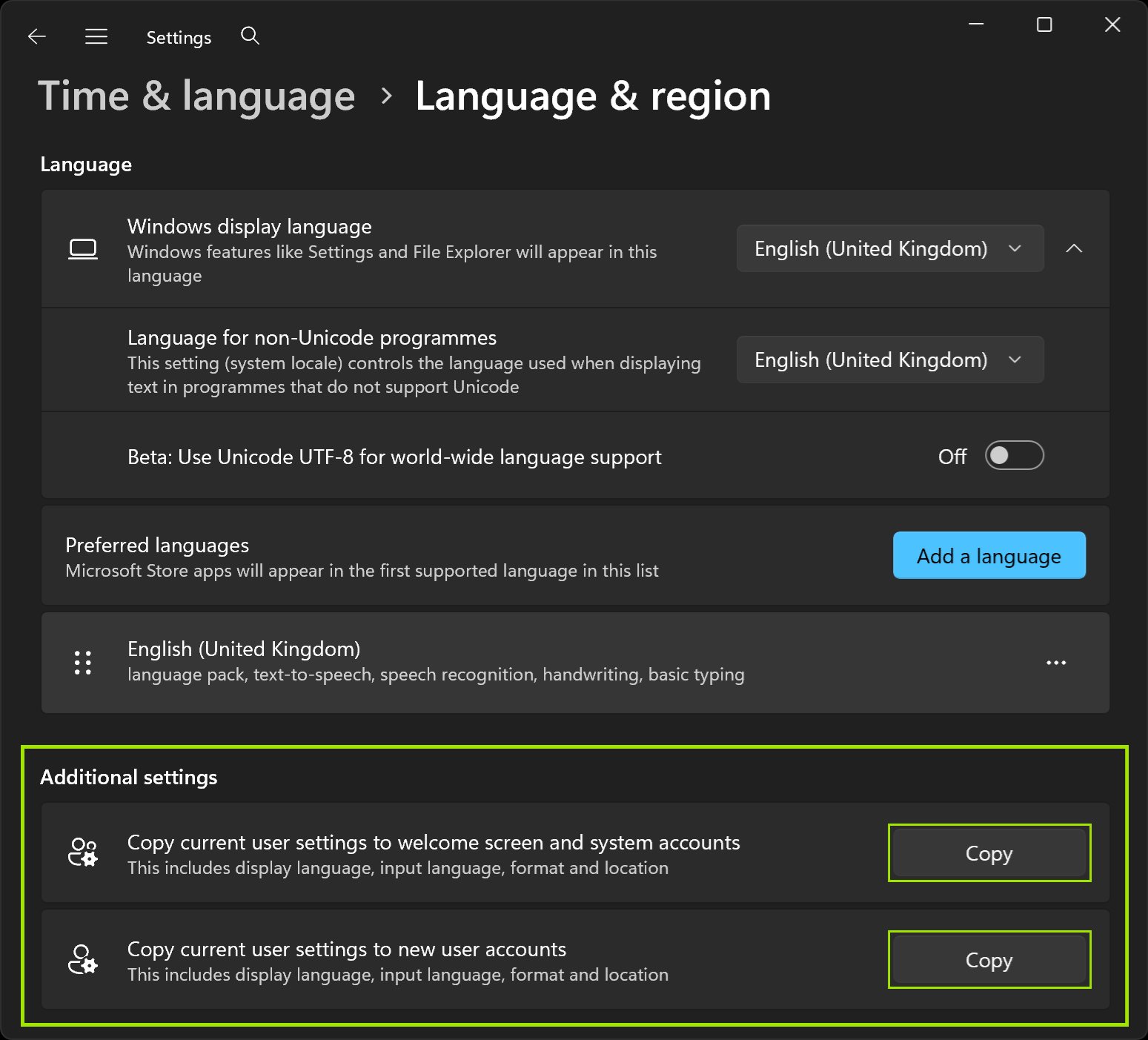
To make sure that additional languages are also used during the login screen or for new users, find the “Copy current user settings” function at the bottom of the “Language & region” dialog:
Reducing the number of pre-installed languages allows us to update our pre-installed systems much more frequently, meaning new customers no longer have to install as many Windows updates after the initial setup. This reduction also significantly reduces storage usage on the system drive and the size of the recovery media. We assume that users from other countries will be able to carry out the initial setup in English.
For further information, see the FAQ: Windows does not include an option to switch to my language – what can I do?
How can I perform a clean install of Windows using an older version of Windows?
See the FAQ article: How to create an official installation medium to install an older version of Windows
Your feedback
If you have any questions about the new Windows version or any additional issue reports, please let us know. Feel free to write us an email or a comment on Reddit or Computerbase, or stop by on our Discord server. We are looking forward to your feedback!
An older article about the previous transition from 23H2 to 24H2 can be found here.